
Maximize your score with these resources:
- Albert.io AP® Computer Science A question banks
- Free AP® Computer Science A study guides
- Free AP® Computer Science A score calculator
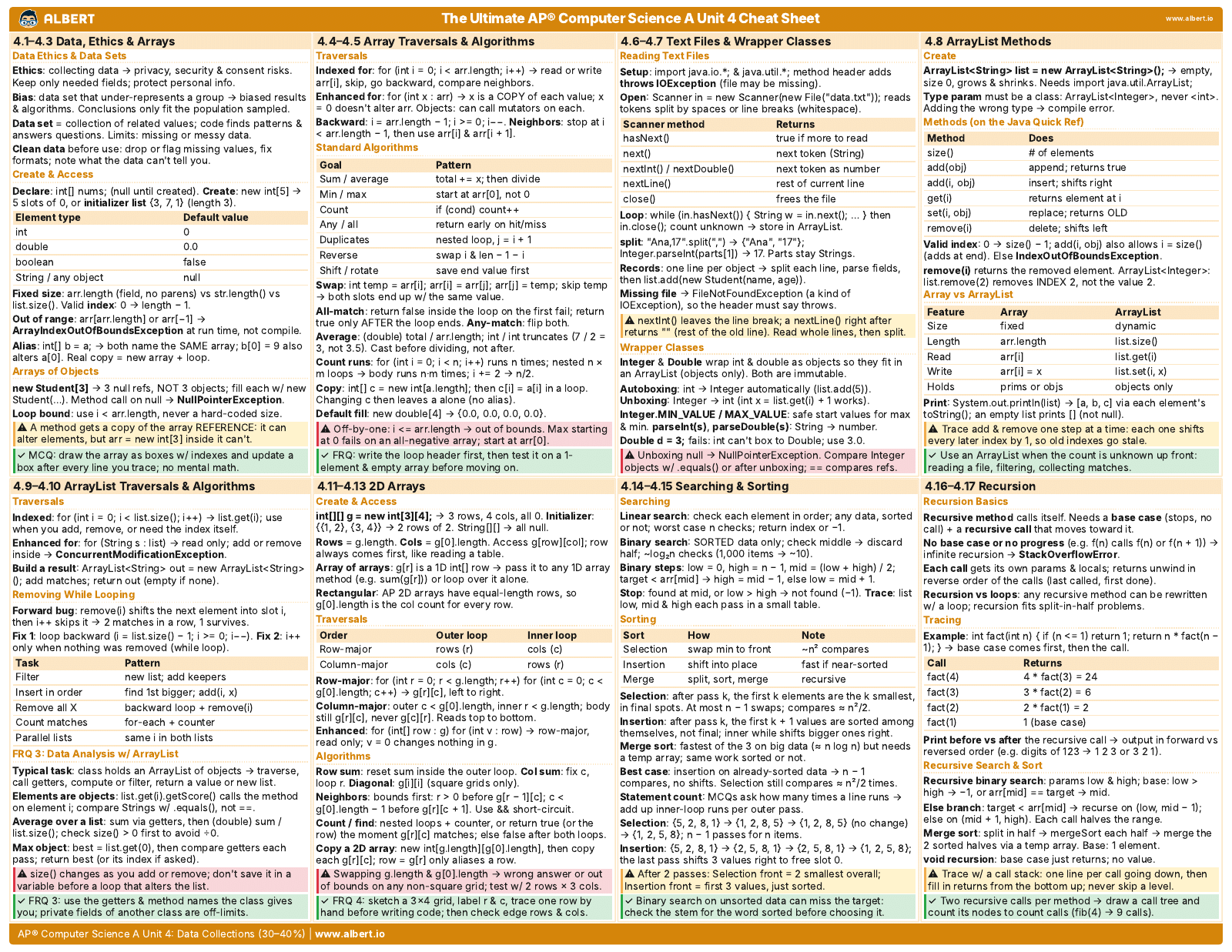
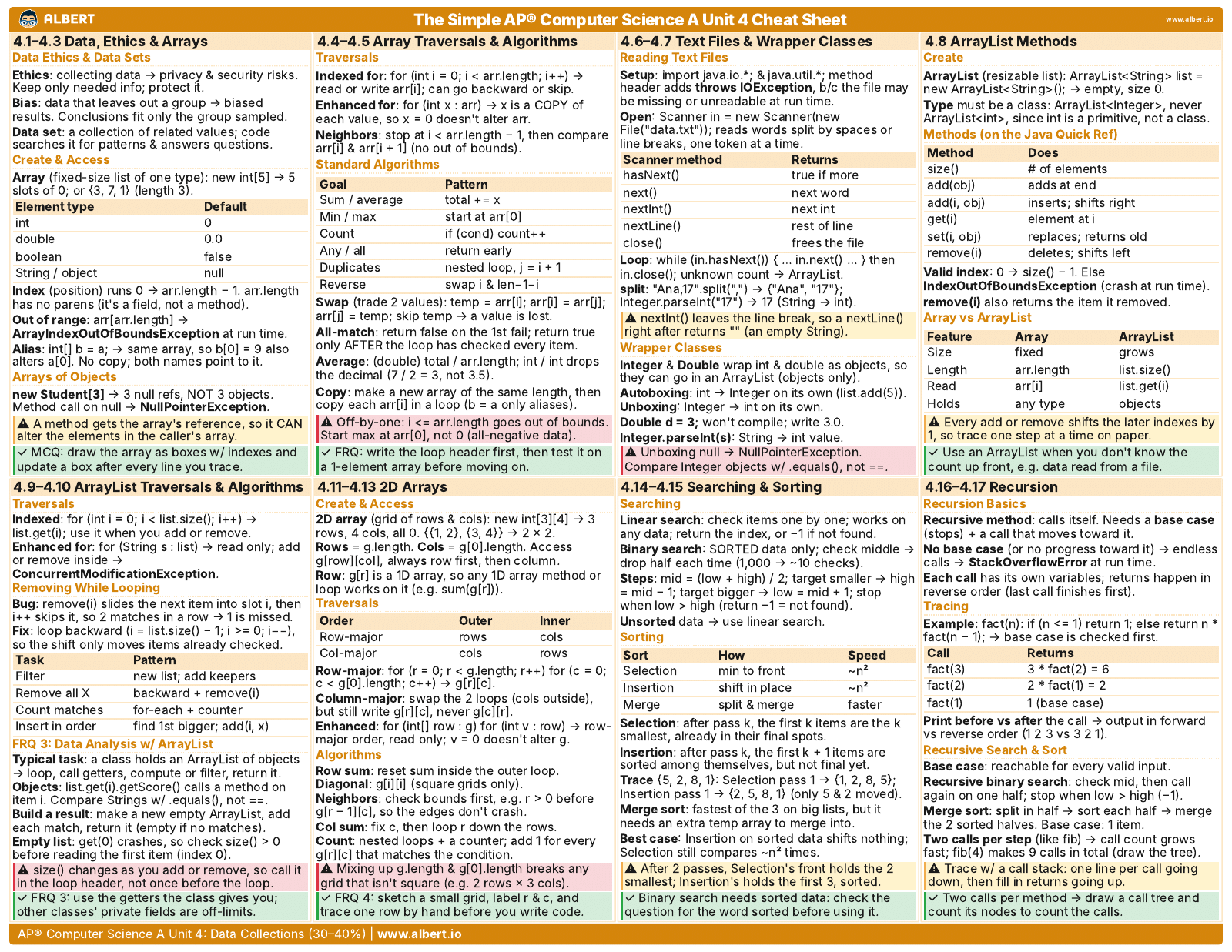
The AP CSA Unit 4 cheat sheet covers Data Collections: arrays, ArrayList, 2D arrays, text files, searching, sorting and recursion. This is the largest unit on the exam at 30–40% of the multiple-choice score, and it drives two of the four free-response questions. Download it in two versions: Simple for a first pass, Ultimate for the dense final review.
Practice AP® Computer Science A Unit 4 questions on Albert
What’s on the AP® Computer Science A Unit 4 Cheat Sheet?
Both versions of the AP CSA Unit 4 cheat sheet cover all 17 topics in Unit 4 of the AP® Computer Science A Course and Exam Description, grouped into eight cards: data ethics and array basics, array algorithms, text files and wrapper classes, ArrayList methods, ArrayList algorithms, 2D arrays, searching and sorting, and recursion.
The Simple version is for students meeting this material for the first time or rebuilding shaky foundations. It keeps the core syntax, the standard loop patterns and the single most common trap for each topic, and it adds a few words of context the first time a term appears (an ArrayList is a “resizable list,” a 2D array is a “grid of rows and columns”).
The Ultimate version is for the last weeks before the exam. It adds the edge cases that multiple-choice questions are built on: what set and remove return, why list.remove(2) on an ArrayList of Integers removes an index rather than a value, how to trace selection and insertion sort pass by pass, how many times a nested loop body runs, and how many calls a two-branch recursive method makes.
Neither version repeats the Java Quick Reference you get on exam day. Instead, they show how to use those methods correctly under time pressure.
AP CSA Unit 4 at a Glance
Unit 4 is weighted at 30–40% of the multiple-choice section, more than any other unit. Its topics:
| Topic | Name | Focus |
|---|---|---|
| 4.1 | Ethical and Social Issues Around Data Collection | Privacy, security and bias in collected data |
| 4.2 | Introduction to Using Data Sets | Finding patterns and the limits of a data set |
| 4.3 | Array Creation and Access | Declaring arrays, default values, indexes |
| 4.4 | Array Traversals | Indexed and enhanced for loops |
| 4.5 | Implementing Array Algorithms | Sum, min/max, count, shift, reverse |
| 4.6 | Using Text Files | File, Scanner, IOException, split |
| 4.7 | Wrapper Classes | Integer, Double, autoboxing and unboxing |
| 4.8 | ArrayList Methods | add, get, set, remove, size |
| 4.9 | ArrayList Traversals | Looping safely while the list changes |
| 4.10 | Implementing ArrayList Algorithms | Filtering, removing and inserting in order |
| 4.11 | 2D Array Creation and Access | Rows, columns and g[row][col] |
| 4.12 | 2D Array Traversals | Row-major and column-major nested loops |
| 4.13 | Implementing 2D Array Algorithms | Row sums, column sums, neighbors |
| 4.14 | Searching Algorithms | Linear and binary search |
| 4.15 | Sorting Algorithms | Selection and insertion sort |
| 4.16 | Recursion | Base cases and tracing recursive calls |
| 4.17 | Recursive Searching and Sorting | Recursive binary search and merge sort |
Key Concepts in Unit 4: Data Collections
Arrays: Creation, Access and Traversal (4.1–4.5)
An array holds a fixed number of values of one type. new int[5] creates five slots, each set to 0; a double array starts at 0.0, a boolean array at false, and an array of any object type, including String, starts full of null. That last point matters: new Student[3] creates three empty references, not three students, and calling a method on one of them throws a NullPointerException.
Valid indexes run from 0 to arr.length − 1. Note that length is a field on arrays, so it has no parentheses, while Strings use length() and ArrayLists use size(). Mixing these up is a quick way to lose a point on a free-response question.
Worked example. Find the largest value in {−4, −9, −2, −7}. If you start max at 0, no element is ever larger, and the method returns 0, a value that is not even in the array. Start max at arr[0] (−4) instead, compare from index 1 on, and the loop correctly ends with −2.
The enhanced for loop (for (int x : arr)) gives you a copy of each value, so assigning to x never changes the array. Use an indexed loop whenever you need to write to the array, compare neighbors, or know where something is.
Exam tip: when a question asks whether every element meets a condition, return false the moment one fails and return true only after the loop finishes. Returning true inside the loop checks only the first element.
Text Files and Wrapper Classes (4.6–4.7)
Reading data from a text file is new to the course. You connect a file with Scanner in = new Scanner(new File(“data.txt”));, add throws IOException to the method header, then read in a while (in.hasNext()) loop and close the Scanner at the end. The constructors and methods you need (hasNext, next, nextInt, nextLine, close) are on the Java Quick Reference.
Worked example. Each line of a file looks like Ana,17. Read the line with nextLine(), call split(“,”) to get the array {“Ana”, “17”}, then convert the second part with Integer.parseInt(parts[1]). Because you don’t know how many lines the file has, add each result to an ArrayList rather than a fixed-size array.
ArrayLists hold objects only, which is why the wrapper classes Integer and Double exist. Java converts between int and Integer automatically (autoboxing and unboxing), so list.add(5) and int x = list.get(0) + 1 both work.
Exam tip: unboxing a null Integer throws a NullPointerException, and == on two Integer objects compares references, not values. Use .equals() or unbox first.
ArrayList Methods and Algorithms (4.8–4.10)
An ArrayList grows and shrinks as you add and remove. add(obj) appends, add(i, obj) inserts and shifts later elements right, set(i, obj) replaces and returns the old value, and remove(i) deletes, shifts later elements left and returns what it removed. Every shift changes the index of every later element, which is what most ArrayList multiple-choice questions test.
Worked example. Remove every “x” from [“a”, “x”, “x”, “b”] with a forward loop that calls remove(i) on a match. At i = 1 the first “x” is removed and the second “x” slides into index 1. The loop then moves to i = 2, which is “b”, so one “x” survives. Looping backward from size() − 1 fixes it, because the shift only moves elements you’ve already checked.
You can’t add or remove inside an enhanced for loop over an ArrayList: Java throws a ConcurrentModificationException. Use an indexed loop, or build a new list and add only the elements you want to keep.
Exam tip: on an ArrayList<Integer>, list.remove(2) removes the element at index 2, not the value 2. Expect at least one question built around that.
2D Arrays (4.11–4.13)
A 2D array is an array of rows. new int[3][4] makes 3 rows and 4 columns; g.length is the number of rows, g[0].length is the number of columns, and an element is always g[row][col]. Each row, g[r], is itself a 1D array, so you can pass it to any method that takes one.
Row-major order puts the row loop outside and the column loop inside; column-major swaps the loops. In both, the body still reads g[r][c].
Worked example. To total each column of a 2 × 3 grid, the outer loop runs over columns (c < g[0].length), you reset the sum to 0 inside it, and the inner loop runs over rows (r < g.length) adding g[r][c]. Swap g.length and g[0].length and the code still works on a square grid but crashes on this one, which is why you should always test your loops on a grid that isn’t square.
Exam tip: when checking a neighbor such as g[r − 1][c], test the bound first (r > 0 && …) so short-circuit evaluation stops the out-of-bounds access.
Searching, Sorting and Recursion (4.14–4.17)
Linear search checks every element and works on any data. Binary search checks the middle element and discards half of what’s left each step, so 1,000 sorted items take about 10 checks, but it only works on sorted data.
Selection sort finds the smallest remaining value and swaps it to the front, so after k passes the first k elements are final. Insertion sort takes the next value and shifts larger values right until it fits, so after k passes the first k + 1 values are sorted among themselves but not necessarily final.
Worked example. Sort {5, 2, 8, 1}. Selection sort’s first pass swaps 5 and 1 to give {1, 2, 8, 5}. Insertion sort’s first pass moves 2 in front of 5 to give {2, 5, 8, 1}. Questions that ask for the array “after two passes” are testing whether you know this difference.
A recursive method calls itself and needs a base case that stops it. For fact(n), which returns 1 when n <= 1 and n * fact(n − 1) otherwise, fact(4) calls down to fact(1), then the returns unwind: 1, 2, 6, 24. Merge sort and recursive binary search use the same idea on halves of an array.
Exam tip: trace recursion with a call stack, one line per call on the way down, then fill in return values on the way back up.
How Unit 4 Shows Up on the Exam
The exam has 42 multiple-choice questions in 90 minutes (55% of the score) and four free-response questions in 90 minutes (45%), all taken in Bluebook. Unit 4 makes up 30–40% of the multiple-choice section, so expect roughly 13 to 17 questions on it. Most are tracing questions: what an array holds after a loop, what an ArrayList looks like after a series of add and remove calls, how many times a statement runs, what a recursive call returns, or what an array looks like after a given number of sorting passes.
Two of the four free-response questions come straight from this unit. Question 3, Data Analysis with ArrayList, gives you a class that stores an ArrayList of objects and asks you to traverse it, call getters, and compute, filter or modify the data. Question 4, 2D Array, asks you to traverse and process a grid. Scorers reward correct loop bounds, accessing elements with the right syntax (get(i) versus [i]), calling the provided methods instead of reaching into private fields, and returning the right value on every path. The scoring guidelines forgive most minor syntax slips, such as a missing semicolon, but logic errors like skipping elements or going out of bounds cost points.
The College Board’s AP® Computer Science A course page has the full Course and Exam Description and past free-response questions, and the Java Quick Reference lists every library method you can use.
Common Mistakes in Unit 4
- Using <= in the loop bound. i <= arr.length reads one slot past the end. Fix: always i < arr.length or i < list.size().
- Removing from an ArrayList in a forward loop. The next element slides into the current index and gets skipped. Fix: loop backward, or only increment i when nothing was removed.
- Starting a max or min at 0. It fails when every value is negative (or, for min, positive). Fix: start at the first element, or at Integer.MIN_VALUE / Integer.MAX_VALUE.
- Swapping rows and columns. Using g.length as the column count breaks every non-square grid. Fix: rows are g.length, columns are g[0].length, and the element is g[row][col].
- Integer division in an average. total / count with two ints drops the decimal. Fix: cast first, (double) total / count.
Frequently Asked Questions
Can I use this cheat sheet on the AP CSA exam?
No. The only reference allowed is the Java Quick Reference built into Bluebook. The AP CSA Unit 4 cheat sheet is a study tool: use it to review before practice sets and to check your work afterward.
Should I start with the Simple or Ultimate version?
Start with Simple if arrays, ArrayLists or recursion still feel new, or if you’re reviewing Unit 4 for the first time. Move to Ultimate once you can write a basic traversal without looking; its extra traps and traces are what separate a 4 from a 5.
Is reading text files really on the exam?
Yes. Topic 4.6 (Using Text Files) is part of the current course, and the File and Scanner classes are on the Java Quick Reference. Expect to read data with Scanner, split lines into parts, and store the results in an array or ArrayList.
Do I need to memorize merge sort?
You should understand how merge sort splits an array in half, sorts each half recursively and merges the results, and be able to trace it. Writing selection sort, insertion sort and binary search from memory is more useful practice for this unit’s multiple-choice questions.
How should I practice AP CSA Unit 4 review?
Trace code by hand. For every practice question, draw the array, ArrayList or grid, update it line by line, and only then pick an answer. Pair that with timed AP CSA Unit 4 practice on free-response Questions 3 and 4.