
Maximize your score with these resources:
- Albert.io AP® Computer Science Principles question banks
- Free AP® Computer Science Principles study guides
- Free AP® Computer Science Principles score calculator
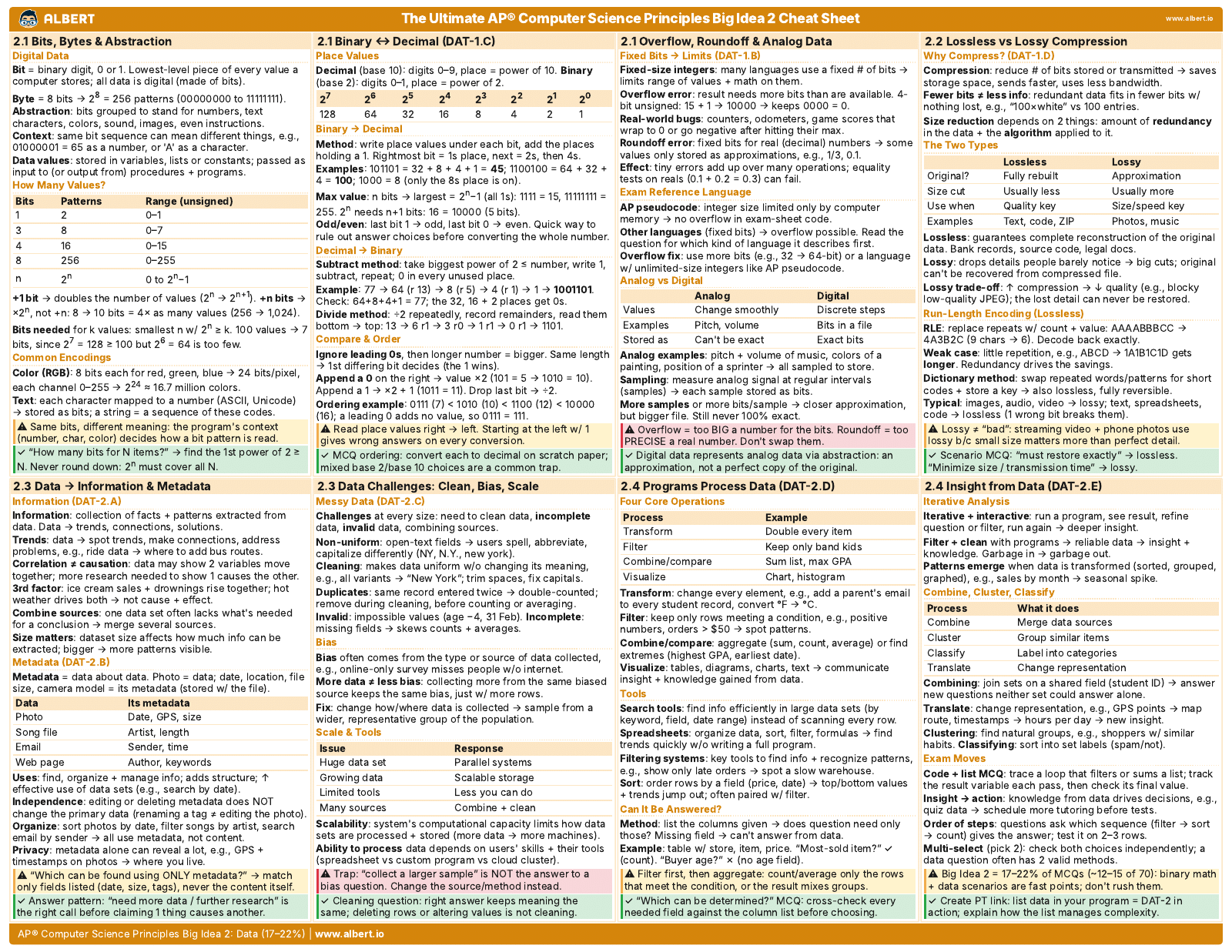
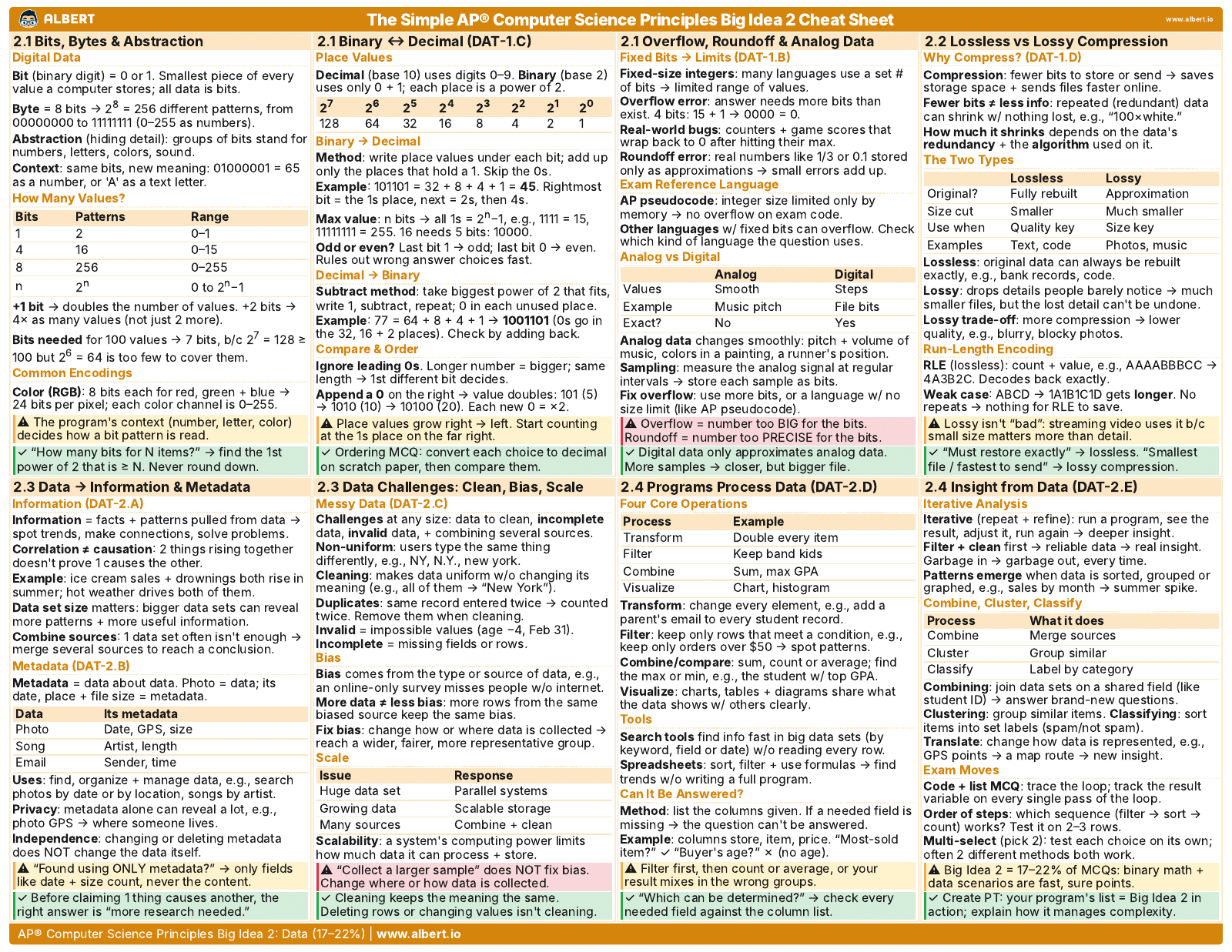
Data is one of the five Big Ideas in AP® Computer Science Principles, and this AP CSP Big Idea 2 cheat sheet covers all of it: bits and binary, lossless and lossy compression, metadata, bias, and how programs turn raw data into information. Big Idea 2 makes up 17–22% of the multiple-choice section. Use the Simple version for a first pass or the Ultimate version for full detail.
Practice AP® Computer Science Principles Big Idea 2 questions on Albert
What’s on the AP CSP Big Idea 2 Cheat Sheet?
Both versions use the same eight cards, so you can switch between them without losing your place. Three cards cover Topic 2.1 (bits, binary conversion, overflow and analog data), one covers Topic 2.2 (compression), two cover Topic 2.3 (information, metadata, cleaning and bias), and two cover Topic 2.4 (how programs filter, transform and visualize data).
Simple is for students meeting this material for the first time or reviewing it a few weeks before the exam. It keeps the core rules, one worked example per skill and the single most common trap on each card, with a few words of context the first time a term appears.
Ultimate is for students who already know the basics and want everything in one place. It adds the divide-by-2 conversion method, the “append a 0 doubles the value” shortcut, run-length encoding’s weak case, dictionary compression, scalability and parallel systems, and the multiple-choice patterns that show up most often in this Big Idea.
Print one, write on it and keep it next to your practice sets. The cards are built for scanning: find the bold term, read the rule beside it, and get back to the question.
AP CSP Big Idea 2 at a Glance
Big Idea 2 is the third-largest share of the multiple-choice section, after Algorithms and Programming (30–35%) and Impact of Computing (21–26%). With 70 multiple-choice questions, 17–22% works out to roughly 12 to 15 questions. The four topics build on each other: represent data, store it efficiently, analyze it, then use programs to do that analysis at scale.
| Topic | Name | Focus |
|---|---|---|
| 2.1 | Binary Numbers | Bits as abstractions, binary ↔ decimal, overflow and roundoff errors, analog sampling |
| 2.2 | Data Compression | Lossless vs lossy, and choosing the right one for a situation |
| 2.3 | Extracting Information from Data | Information vs data, metadata, cleaning, bias, correlation vs causation, scale |
| 2.4 | Using Programs with Data | Filtering, transforming, combining and visualizing data to gain insight |
The learning objectives fall under two enduring understandings in the College Board’s AP® Computer Science Principles course framework: DAT-1 (data representation and compression) and DAT-2 (extracting information from data).
Key Concepts in Big Idea 2: Data
Bits, Bytes and Abstraction (Topic 2.1)
Everything a computer stores is built from bits, each a 0 or a 1. Eight bits make a byte. On their own, bits mean nothing; a program groups them and decides what they stand for. That is abstraction: the same pattern 01000001 can be the number 65 or the letter A, depending on context.
The counting rule matters more than any other fact in this topic. With n bits you can make 2n different patterns, so the values run from 0 to 2n − 1. Adding one bit doubles the number of patterns. Adding two bits multiplies it by four, not by two.
Worked example: A school wants a unique binary ID for each of its 1,200 students. How many bits does each ID need? Find the smallest power of 2 that is at least 1,200. 210 = 1,024 is too small, and 211 = 2,048 covers everyone, so the answer is 11 bits.
Exam tip: Never round down. If a question asks how many bits are needed and your power of 2 falls short of the count by even one item, go up a bit.
Converting Between Binary and Decimal (Topic 2.1)
Binary is base 2, so each place is worth a power of 2: 1, 2, 4, 8, 16, 32, 64, 128, reading from right to left. To convert binary to decimal, write the place value under each bit and add the places that hold a 1.
Worked example: 101101 has 1s in the 32, 8, 4 and 1 places. 32 + 8 + 4 + 1 = 45.
To go the other way, take the largest power of 2 that fits, write a 1 in that place, subtract, and repeat. For 77: 64 fits (13 left), 8 fits (5 left), 4 fits (1 left), 1 fits (0 left). Fill the unused places with 0s and you get 1001101.
Questions also ask you to order binary numbers. Ignore leading zeros, then the longer number is larger. If two numbers are the same length, the first place where they differ decides it, and the one with the 1 wins.
Exam tip: Check the last bit first. A 1 in the rightmost place means the number is odd, which often eliminates two answer choices before you convert anything.
Overflow, Roundoff and Analog Data (Topic 2.1)
Many programming languages store integers in a fixed number of bits. When a result needs more bits than exist, you get an overflow error. With 4 bits, 15 is 1111; adding 1 gives 10000, which needs a fifth bit, so the stored value wraps to 0000.
Real numbers have a different problem. A fixed number of bits can only approximate values like 1/3 or 0.1, which causes roundoff errors that build up over many calculations.
One detail catches a lot of students: in the language on the AP exam reference sheet, integer size is limited only by the computer’s memory. Exam pseudocode does not overflow. If a question describes a different language with a fixed number of bits, overflow becomes possible.
Analog data, such as the pitch of a song or the position of a runner, changes smoothly. Computers capture it by sampling: measuring the signal at regular intervals and storing each measurement as bits. More samples give a closer approximation and a bigger file, but the result is never a perfect copy.
Exam tip: Overflow means a number is too big for the bits. Roundoff means a number is too precise for them. Questions often place the two side by side.
Lossless vs Lossy Compression (Topic 2.2)
Compression reduces the number of bits needed to store or send data. Fewer bits does not always mean less information, because repeated (redundant) data can be stored more efficiently. How much a file shrinks depends on both the amount of redundancy and the algorithm.
Lossless compression guarantees the original can be rebuilt exactly. Lossy compression throws away detail people are unlikely to notice. It usually shrinks files much more, but only an approximation can be restored.
Worked example: Run-length encoding replaces repeats with a count and a value. AAAABBBCC becomes 4A3B2C, six characters instead of nine, and decoding returns the original exactly, so it is lossless. Now try ABCD: it becomes 1A1B1C1D, which is longer. No repetition means nothing to save.
Exam tip: Read the scenario for its priority. If the original must be restored exactly (bank records, source code, a legal document), choose lossless. If the goal is the smallest file or the fastest transmission (streaming video, photos on a phone), choose lossy.
Information, Metadata and Messy Data (Topic 2.3)
Information is the set of facts and patterns you extract from data. Data can reveal trends and connections, but a correlation between two variables does not show that one causes the other. Additional research is needed before claiming cause and effect.
Metadata is data about data. For a photo, the image is the data; the date, location and file size are metadata. Metadata helps you find, organize and manage data, and changing or deleting it does not change the data itself.
Real data sets are messy. They can be incomplete, contain invalid values, or record the same thing in different ways. Cleaning makes data uniform without changing its meaning: replacing “NY,” “N.Y.” and “new york” with “New York” is cleaning; deleting rows you dislike is not.
Bias usually comes from how or where data is collected. A survey run only online misses people without internet access, and collecting a million more online responses keeps the same bias.
Exam tip: When an answer choice says “collect more data” to fix bias, it is almost always wrong. Look for the choice that changes the source or method.
Using Programs with Data (Topic 2.4)
Programs process data in four main ways: transform every element (double each value, add a parent’s email to every student record), filter to keep only rows that meet a condition, combine or compare (sum, average, find the highest GPA), and visualize with charts and tables. Spreadsheets and search tools do much of this without a full program.
The process is iterative: run the program, look at the result, refine the question, run it again. Patterns that are invisible in raw data often appear once it is sorted, grouped or graphed. Combining data sets on a shared field, clustering similar items and classifying items into categories all lead to new insight.
Worked example: A table lists store, item and price for every sale. Can you find the most-sold item? Yes: count rows by item. Can you find the average age of buyers? No: there is no age column, so no program can produce it from this data.
Exam tip: For “which of the following can be determined” questions, list every field the question needs and check each against the columns given.
How Big Idea 2 Shows Up on the Exam
Big Idea 2 is tested mainly in the multiple-choice section, which is 70 questions in 120 minutes and 70% of your score. Expect three kinds of questions.
First, direct computation: convert a binary number, order a set of binary values, or find how many bits a set of items needs. These are quick points if you know the place values.
Second, scenario questions: a company wants to send photos faster, a researcher finds two variables moving together, a survey reaches only one group. You decide which compression type fits, whether a conclusion is justified, or what caused a problem.
Third, data set questions: you get a description of the columns in a data set or a short program that processes a list, and you decide what information can be found or what the program outputs. Some of these are multiple-select questions where two answers are correct.
Big Idea 2 also supports your Create performance task. If your program uses a list to manage data, you are applying DAT-2 directly, and you will need to explain how that list manages complexity in your written responses.
Common Mistakes in Big Idea 2
- Rounding down on bit counts. Saying 6 bits can represent 100 values. Fix: 26 = 64, which is too few; you need 7.
- Reading place values from the left. Treating the leftmost bit as the 1s place. Fix: the 1s place is always on the far right.
- Assuming exam pseudocode overflows. Fix: the exam reference language has no fixed integer size, so overflow only applies to languages the question says use fixed bits.
- Calling lossy compression “bad.” Fix: lossy is the right choice when size or speed matters more than perfect detail.
- Treating correlation as proof. Fix: two variables moving together justify more research, not a causal claim.
Frequently Asked Questions
Can I use this cheat sheet on the exam?
No. The only material you get on exam day is the official AP CSP Exam Reference Sheet for pseudocode. The AP CSP Big Idea 2 cheat sheet is a study tool for review and practice before the test.
Should I start with the Simple or the Ultimate version?
Start with Simple if binary conversion or compression still feels shaky, then move to Ultimate once the core rules feel automatic. If you already score well on Big Idea 2 practice, go straight to Ultimate for the extra traps and shortcuts.
Do I need to know hexadecimal for AP CSP?
The learning objective on number bases asks you to convert between binary and decimal and to compare binary numbers. Focus your practice there.
How should I practice AP CSP Big Idea 2?
Mix quick conversion drills with scenario questions. Do ten binary conversions without a calculator, then work a set of compression and data set questions, checking each wrong answer against the AP CSP Big Idea 2 cheat sheet card it belongs to. That makes your AP CSP Big Idea 2 review targeted instead of general.