
A science article, a history textbook chapter, a news report, and a set of instructions for building a bookshelf have one thing in common: they exist to inform. These are informational texts, and they make up most of what adults read every day. They also make up a large share of the passages on standardized reading tests. Reading them well requires different habits from reading stories, because the goal is to understand ideas, evidence, and how they are organized.
This article covers Topic 4.3: Reading Informational Texts in Unit 4, Reading Strategies. The topic asks you to use text features, identify organizational structures, find central ideas and supporting details, and evaluate how authors develop information.
By the end, you should be able to:
- Identify common types of informational texts.
- Use text features to preview and navigate a text.
- Recognize common organizational structures and their signal words.
- Identify central ideas and the details that support them.
Types of Informational Texts
- Expository texts: explain a topic, such as textbooks and encyclopedia articles.
- Argumentative and persuasive texts: try to convince readers, such as editorials and speeches.
- Procedural texts: give step-by-step directions, such as recipes and manuals.
- Literary nonfiction: tells true stories with literary techniques, such as memoirs, biographies, and narrative journalism.
- Primary source documents: such as letters, speeches, and historical records.
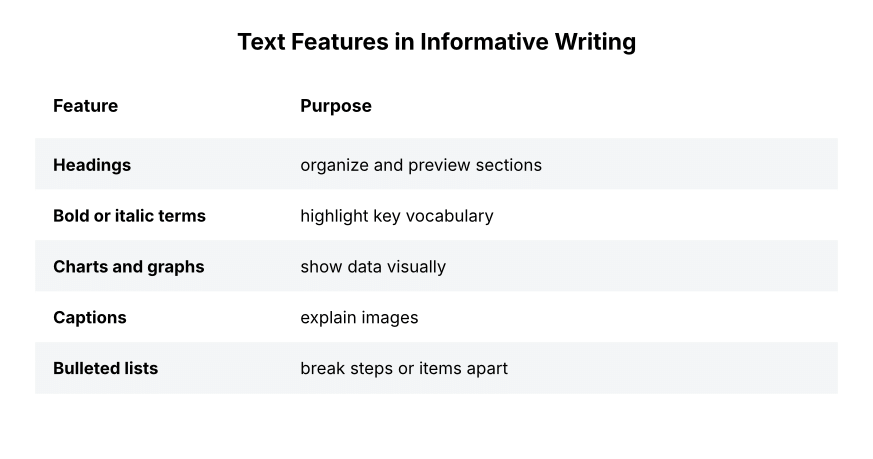
Text Features
| Feature | Purpose |
|---|---|
| Title and headings | Show the topic and how the text is divided |
| Bold or italic words | Highlight key vocabulary |
| Captions | Explain images |
| Charts, graphs, and maps | Present data visually |
| Sidebars | Add related information |
| Glossary and index | Define terms and locate topics |
Previewing text features before reading gives you a map of the content, which makes the full text easier to follow.
Organizational Structures
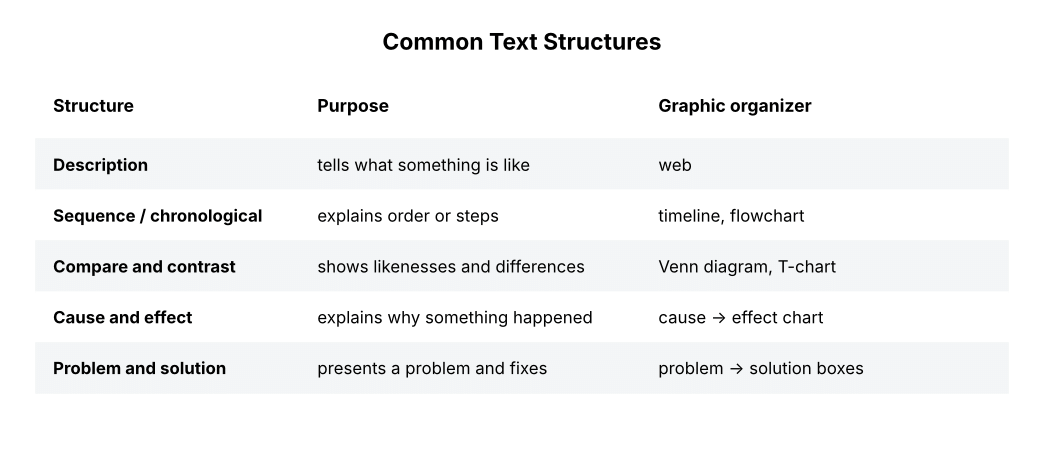
Authors organize information in predictable patterns. Signal words help you recognize them.
| Structure | Purpose | Signal Words |
|---|---|---|
| Chronological / sequence | Shows order of events or steps | first, next, then, finally, in 1920 |
| Cause and effect | Explains why something happens | because, as a result, therefore, led to |
| Compare and contrast | Shows similarities and differences | similarly, however, unlike, both |
| Problem and solution | Presents a problem and possible fixes | problem, issue, solution, one answer |
| Description | Describes features or characteristics | for example, such as, includes |
Why does this matter? Recognizing structure tells you what kind of information to look for. In a cause-and-effect text, you track causes and results. In a compare-and-contrast text, you track similarities and differences. Test questions often ask about a text’s structure or the purpose of a specific paragraph.
Central Ideas and Supporting Details
The central idea is the most important point the author makes about the topic. Supporting details, such as facts, statistics, examples, and expert quotations, explain or prove it.
Worked example:
The invention of the printing press in the mid-1400s transformed Europe. Before Johannes Gutenberg’s press, books were copied by hand, making them rare and expensive. Printing allowed books to be produced far more quickly and cheaply. As books spread, more people learned to read, and new ideas in science, religion, and politics traveled faster than ever before.
- Topic: the printing press.
- Central idea: the printing press transformed Europe.
- Structure: cause and effect.
- Supporting details: hand-copied books were rare; printing made books faster and cheaper; literacy rose; ideas spread faster.
Tracking the Author’s Purpose
Even informational texts have a purpose beyond simply presenting facts. An author may want to explain a process, warn readers about a problem, or persuade them to support a solution. Look at which facts the author chooses to include, which are emphasized, and how the text ends. A conclusion that calls for action usually signals a persuasive purpose, while a neutral summary suggests the goal is to inform. Identifying purpose helps you read critically instead of accepting every statement at face value.
Reading Graphics with Text
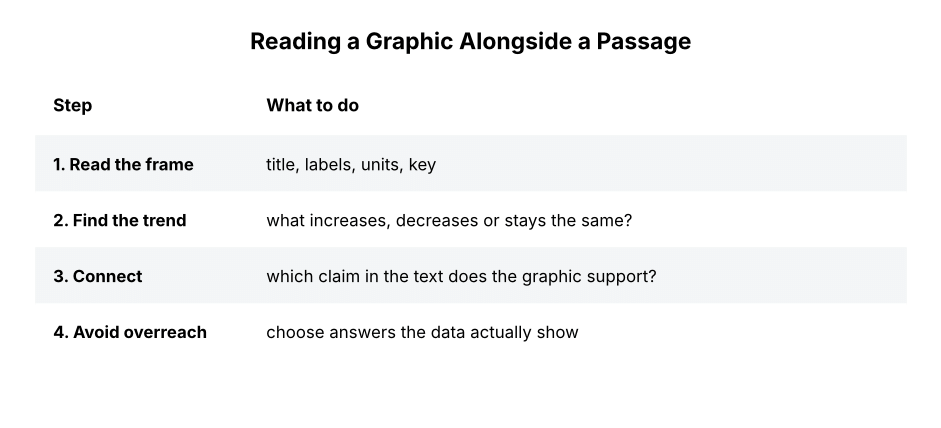
Charts and graphs often contain information that the text does not repeat. Read the title, axis labels, legend, and units carefully. Then ask how the graphic supports or extends the text. Standardized tests frequently ask whether data in a graph supports a claim in the passage.
Why does this matter? Informational reading is a lifelong skill. Understanding how authors organize and support information helps you learn independently in any subject and make sense of news, reports, and research.
Test-Taking Strategies
Mnemonic Devices and Memory Shortcuts
For structures, remember “Some Clever Cats Prefer Dinner”: Sequence, Cause and effect, Compare and contrast, Problem and solution, Description.
Cross-Topic Connections
- Structures are explored further in Topic 2.6: Analyzing Text Structure in Nonfiction.
- Finding the main point uses Topic 1.2: Finding the Central Idea.
- Graphs and charts are covered in Topic 3.3: Analyzing Visual and Quantitative Information.
- Judging sources uses Topic 3.7: Identifying Bias and Reliability in Sources.
Common Question Formats
- Identify the central idea of a passage.
- Determine the organizational structure.
- Explain the purpose of a text feature or paragraph.
- Decide whether a graph supports a claim in the text.
Frequent Student Mistakes
- Skipping graphs, captions, and headings.
- Confusing a supporting detail with the central idea.
- Ignoring signal words that reveal structure.
Test-Day Shortcuts
Read the first and last sentences of each paragraph first. They often state the paragraph’s main point and its connection to the central idea.
Time Management Tips
On English unit tests and standardized reading tests such as the SAT and ACT, informational passages often move faster than literary ones. Spend saved time on graph and data questions.