
Maximize your score with these resources:
- Albert.io AP® Computer Science Principles question banks
- Free AP® Computer Science Principles study guides
- Free AP® Computer Science Principles score calculator
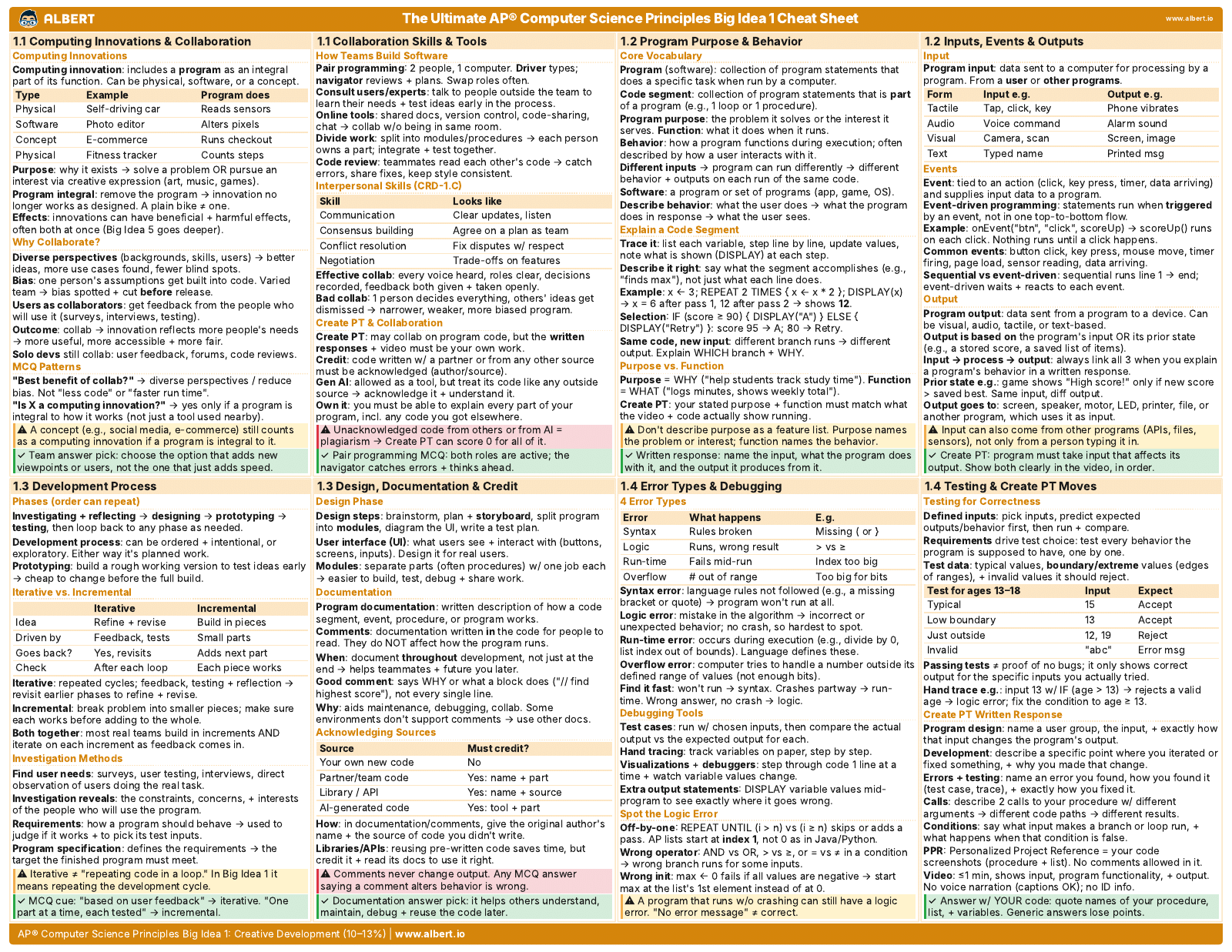
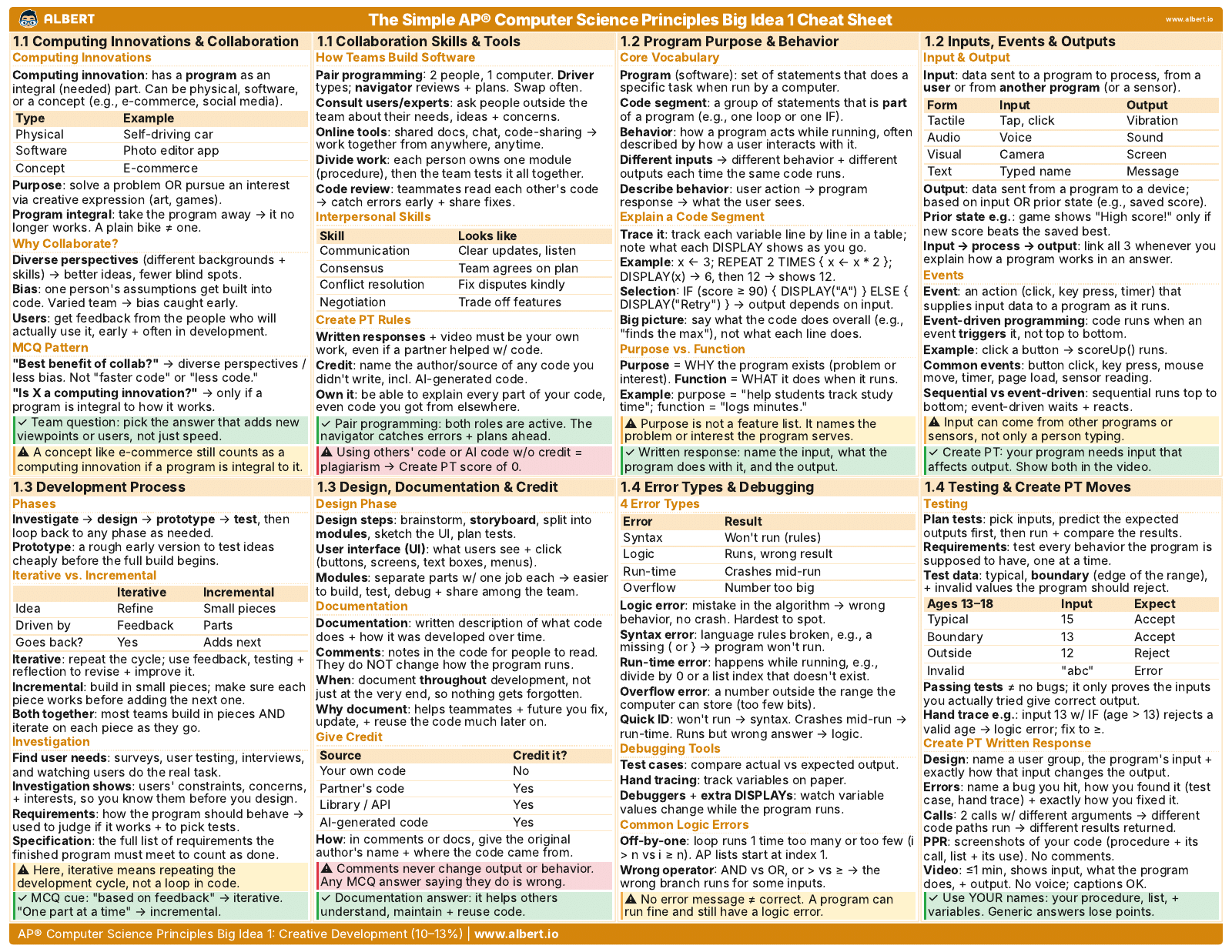
This AP CSP Big Idea 1 cheat sheet covers Creative Development: how teams collaborate, what programs do with inputs and events, how iterative and incremental development work, and how to find and fix errors. The unit is worth 10–13% of the AP® Computer Science Principles multiple-choice section. Pick the Simple version for a quick review or the Ultimate version for full depth.
Practice AP® Computer Science Principles Big Idea 1 questions on Albert
What’s on the AP® Computer Science Principles Big Idea 1 Cheat Sheet?
The sheet packs all four Creative Development topics onto one landscape page with eight cards: two for collaboration, two for program purpose and inputs/outputs, two for the development process and documentation, and two for errors and testing. Every card ends with a warning about a common trap or a tip you can use on test day.
Simple is for students meeting this unit for the first time or reviewing in the last week. It keeps the core definitions (computing innovation, event, iterative vs. incremental, the four error types), one worked example per idea, and the most-tested trap on each card. The text is larger and each term gets a few words of context.
Ultimate is for students aiming for a 4 or 5. It adds the MCQ wording patterns, more logic-error examples (off-by-one, wrong operator, bad starting value), a full boundary-testing table, and a checklist for the Create performance task written responses. Start with Simple if the vocabulary still feels new; move to Ultimate once you can define every bold term without looking. Either way, the AP CSP Big Idea 1 cheat sheet works best as a creative development study guide you test yourself on, not something you just reread.
AP CSP Big Idea 1 at a Glance
Big Idea 1 is worth 10–13% of the multiple-choice section. It is also the backbone of the Create performance task, because the written responses ask you to explain how you designed, built, and debugged your own program. The College Board’s AP® Computer Science Principles exam page lays out the full format.
| Topic | Name | Focus |
|---|---|---|
| 1.1 | Collaboration | Why diverse teams build better, less biased innovations; pair programming and team skills |
| 1.2 | Program Function and Purpose | What a program is for, how it behaves, and how inputs and events produce outputs |
| 1.3 | Program Design and Development | Iterative and incremental development, design tools, documentation, and giving credit |
| 1.4 | Identifying and Correcting Errors | Syntax, logic, run-time, and overflow errors; debugging and choosing test cases |
This unit has fewer facts to memorize than Big Idea 3, but the questions are wordy, so AP CSP Big Idea 1 review should include plenty of practice with scenario questions. Most points here come from reading a scenario carefully and matching it to the right vocabulary term.
Key Concepts in Big Idea 1: Creative Development
Computing Innovations and Collaboration (Topic 1.1)
A computing innovation is anything that has a program as an integral part of how it works. That includes physical objects (a self-driving car or a fitness tracker), pure software (a photo editor), and concepts (e-commerce or social media). The test for “integral” is simple: take the program away, and does the innovation still do its job? A plain bicycle passes that test, so it is not a computing innovation. A bike-share system that unlocks bikes from an app fails it, so it is one.
The CED’s main claim about collaboration is that diverse perspectives improve innovations. People with different backgrounds notice different use cases, and they catch bias that one developer would build in without realizing it.
Worked example: A team of four students who all use iPhones builds a school events app and only tests it on iPhones. A teammate who uses an older Android phone and a screen reader would spot two problems right away: the layout breaks on smaller screens, and the buttons have no labels for the screen reader. Neither problem is a coding skill issue. Both are perspective issues.
Exam tip: When a question asks for the best benefit of collaboration, pick the answer about new viewpoints or reduced bias. Answers about the program running faster or using fewer lines of code are distractors.
Team Practices and Giving Credit (Topic 1.1 and 1.3)
The CED names specific practices: pair programming (a driver types while a navigator reviews and plans, then they swap), consulting users and experts outside the team, and using online tools such as shared documents and version control so people can work on the same code from different places. It also lists interpersonal skills: communication, consensus building, conflict resolution, and negotiation.
Credit is part of collaboration. Any code you did not write yourself, whether it came from a partner, a library, an API, or a generative AI tool, has to be acknowledged in your documentation with the author or source. On the Create performance task you may work with a partner on the program code, but your written responses must be your own work.
Worked example: You use a library procedure called sortList and a function that ChatGPT suggested for checking valid email formats. A good acknowledgment reads: “sortList is from the Code.org list library. isValidEmail was generated with ChatGPT and modified by me to reject addresses without a period.” That names the source and what you changed.
Exam tip: In pair programming questions, both roles are active. The navigator is not just watching; they are checking for errors and thinking ahead.
Program Purpose, Behavior, Inputs, and Events (Topic 1.2)
A program is a collection of statements that performs a specific task when run. A code segment is part of a program. A program’s purpose is why it exists (to solve a problem or pursue an interest). Its function is what it actually does. Its behavior is how it acts while running, usually described through how a user interacts with it.
Input is data sent to a program for processing. It can be tactile, audio, visual, or text, and it can come from a user or from another program. An event is an action, like a click, a key press, or a timer firing, that supplies input. In event-driven programming, code runs when an event triggers it instead of running top to bottom. Output is data the program sends to a device, and it depends on the input or on the program’s prior state.
Worked example: Trace this segment in AP pseudocode: x ← 3, then REPEAT 2 TIMES { x ← x * 2 }, then DISPLAY(x). After the first pass x is 6, after the second it is 12, so the program displays 12. If the first line read x ← 5, the output would be 20. Same code, different input, different output.
Exam tip: When you describe a program, link all three parts: the input, what the program does with it, and the output. Leaving out the middle step is the most common way to lose a written response point.
The Development Process and Documentation (Topic 1.3)
Development usually moves through investigating, designing, prototyping, and testing, then loops back. Two words show up constantly. An iterative process repeats cycles, using feedback, testing, and reflection to revisit earlier phases. An incremental process breaks the problem into small pieces and makes sure each piece works before adding the next. Real teams usually do both.
Investigation tools include surveys, user testing, interviews, and direct observation. Design tools include brainstorming, storyboarding, splitting the program into modules, sketching the user interface, and writing a test plan. Documentation describes how code works and how it was built, and comments are documentation written inside the code. Comments never change how a program runs.
Worked example: A student builds a quiz app by first getting one question to display, then adding answer checking, then adding a score. That is incremental. After classmates test it and say the timer is too short, she lengthens it and tests again. That is iterative.
Exam tip: “Based on user feedback” signals iterative. “One part at a time” signals incremental. In this unit, iterative never means a loop in code.
Errors, Debugging, and Testing (Topic 1.4)
The CED names four error types. A syntax error breaks the language’s rules, so the program will not run. A logic error is a mistake in the algorithm that produces wrong or unexpected results without crashing. A run-time error happens during execution, such as dividing by zero or using a list index that does not exist. An overflow error happens when a number is outside the range the computer can represent.
Debugging tools include test cases, hand tracing, visualizations, debuggers, and adding extra output statements to see values mid-run. Good test data covers typical values, boundary values, and invalid values, and it is chosen based on the program’s requirements.
Worked example: A sign-up program should accept ages 13 through 18 and uses IF (age > 13 AND age < 18). Testing 15 works, so a careless tester might stop. Testing the boundaries 13 and 18 shows both are rejected. That is a logic error, and the fix is to use ≥ and ≤. Testing 12 and 19 confirms they are still rejected.
Exam tip: A program that runs with no error message can still be wrong. If a question describes a program that “runs but gives the wrong answer,” the answer is logic error.
How Big Idea 1 Shows Up on the Exam
On the multiple-choice section, Big Idea 1 questions are usually short scenarios. You will read about a team, a development step, or a bug and pick the term or action that fits. Expect questions like “Which of the following best describes the benefit of including users in testing?”, “Which type of error is described?”, and “Which set of test inputs would best check this program?” Some questions show a short pseudocode segment with a bug and ask which change fixes it.
Big Idea 1 matters even more on the written response section, where you answer questions about the program you built for the Create performance task using your Personalized Project Reference (screenshots of your procedure and list, with no comments). Prompts ask you to identify a group of users and how your program meets their needs, describe a point in development where you found and fixed an error, and explain how different inputs or calls lead to different results. Scorers reward answers that use your actual code: your procedure name, your list name, and a specific bug you actually fixed. Generic answers that could describe any program earn little credit.
Common Mistakes in Big Idea 1
- Mistake: Thinking comments affect how a program runs. Fix: Comments are for people only. An answer that says a comment changes output is always wrong.
- Mistake: Confusing iterative with incremental. Fix: Iterative revisits and refines based on feedback. Incremental adds small working pieces one at a time.
- Mistake: Calling any wrong answer a syntax error. Fix: If the program runs, it is not a syntax error. Wrong result with no crash is a logic error.
- Mistake: Testing only typical values. Fix: Always test the boundaries and at least one invalid input. Most logic errors hide at the edges.
- Mistake: Writing purpose as a feature list. Fix: Purpose names the problem or interest. Function names what the program does.
Frequently Asked Questions
Can I use the AP CSP Big Idea 1 cheat sheet on the exam?
No. No notes are allowed on the exam. The cheat sheet is a study tool for review sessions, homework, and the weeks before test day. The only reference you get during the exam is the College Board’s exam reference sheet for pseudocode.
Should I start with the Simple or the Ultimate version?
Start with Simple if you are new to the unit or short on time. Once you can explain every bold term in your own words, switch to Ultimate for the extra MCQ patterns, logic-error examples, and Create performance task checklist.
How much is Big Idea 1 worth on the AP CSP exam?
Big Idea 1 makes up 10–13% of the multiple-choice section. Its ideas also drive the Create performance task written responses, so its real weight in your final score is higher than that number suggests.
Can I use AI to help write my Create performance task program?
The College Board allows generative AI as a tool, but you must acknowledge any AI-generated code the same way you would credit a partner or a library, and you must be able to explain how all of your code works. Check your teacher’s and the College Board’s current guidance before you start.
What is the difference between a logic error and a run-time error?
A run-time error stops the program partway through, such as dividing by zero. A logic error lets the program finish but gives the wrong result, which makes it harder to notice.