
Maximize your score with these resources:
- Albert.io AP® Computer Science Principles question banks
- Free AP® Computer Science Principles study guides
- Free AP® Computer Science Principles score calculator
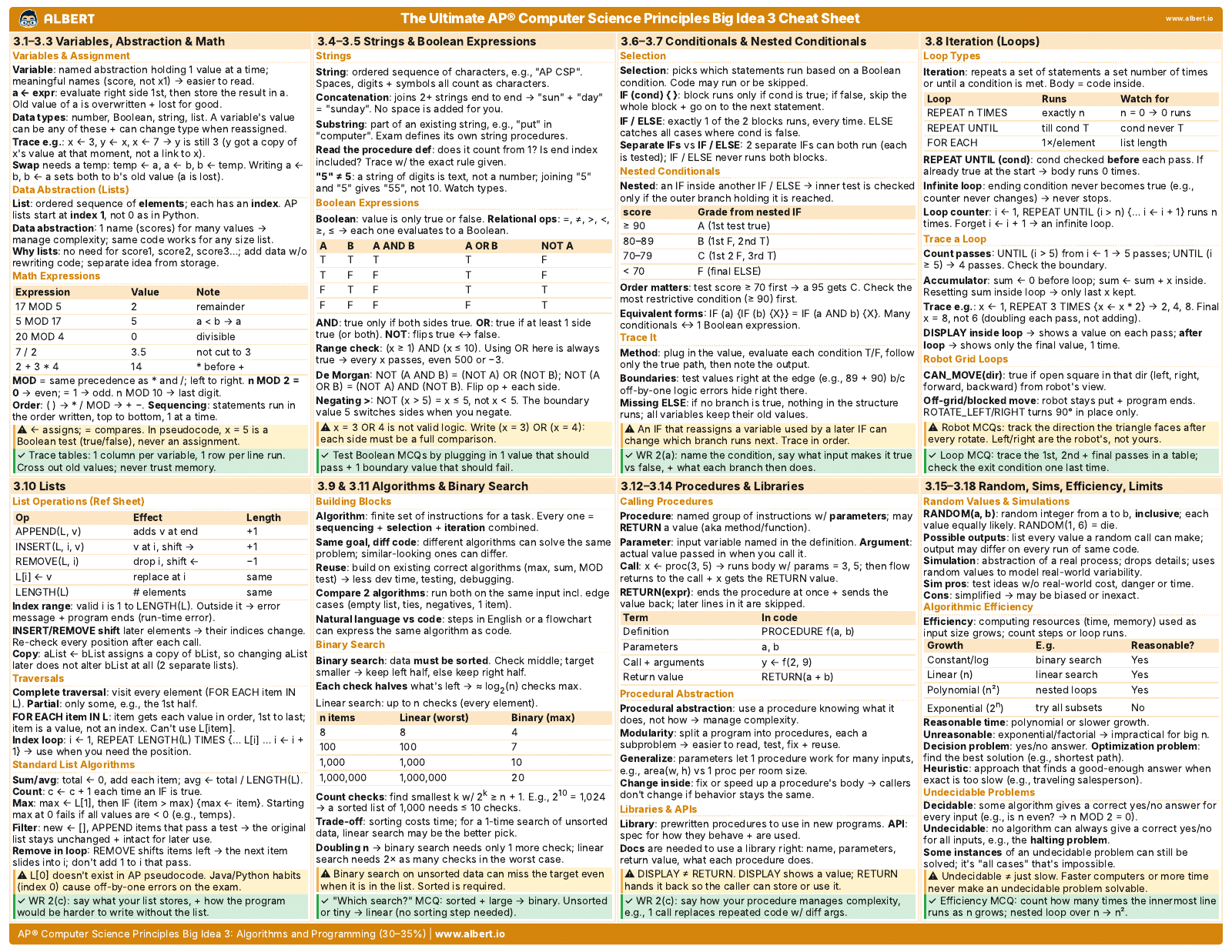
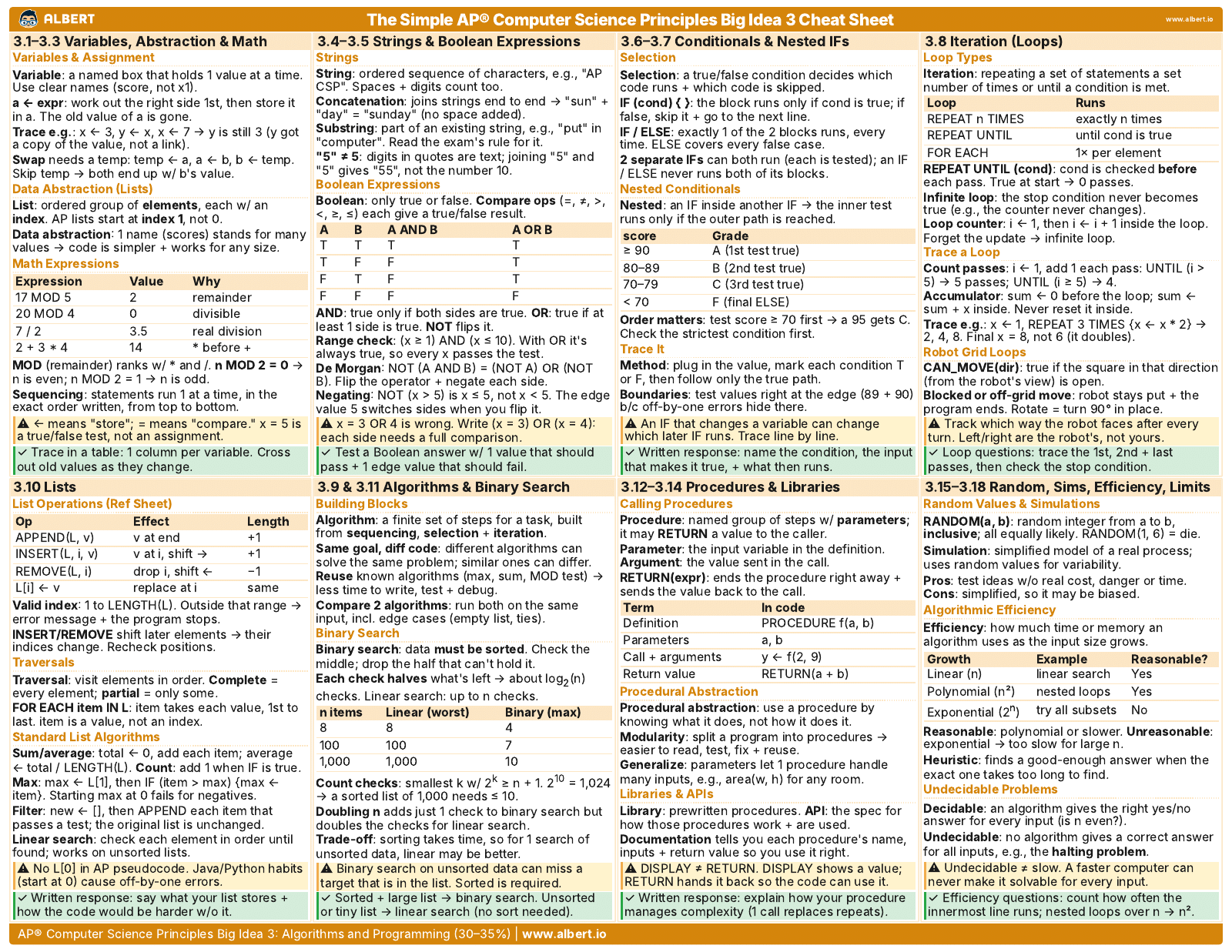
This AP CSP Big Idea 3 cheat sheet covers Algorithms and Programming, the largest part of the AP® Computer Science Principles exam at 30–35% of the multiple-choice score. It runs from variables and Boolean logic through lists, procedures, binary search and undecidable problems. Pick the Simple version for a first pass or the Ultimate version for dense, last-week review.
Practice AP® Computer Science Principles Big Idea 3 questions on Albert
What’s on the AP CSP Big Idea 3 Cheat Sheet?
Both versions of the AP CSP Big Idea 3 cheat sheet use the same eight cards, grouped by the College Board’s topics 3.1 through 3.18: variables and math, strings and Boolean expressions, conditionals, loops, lists, algorithms and binary search, procedures and libraries, and a final card on random values, simulations, efficiency and undecidable problems.
The Simple version is for students who are still building the basics. It keeps each card to the core rule, one worked trace and the single trap most likely to cost you a question. Start here if loops or lists still feel shaky.
The Ultimate version packs in more: extra trace examples, De Morgan’s laws, the full list of list operations, a binary search check-count table, and more of the multiple-choice traps that show up year after year. Use it once the Simple sheet feels easy, or as your final review before exam day.
Neither sheet copies the Exam Reference Sheet you get on test day. Instead, they show you how to use those pseudocode statements correctly, which is where most points are lost.
AP CSP Big Idea 3 at a Glance
Big Idea 3 is weighted at 30–35% of the end-of-course multiple-choice section, more than any other big idea. It also drives much of the written response section about your Create performance task program.
| Topic | Name | Focus |
|---|---|---|
| 3.1 | Variables and Assignments | Storing and updating values with ← |
| 3.2 | Data Abstraction | Using lists to manage complexity |
| 3.3 | Mathematical Expressions | Order of operations, MOD, sequencing |
| 3.4 | Strings | Concatenation and substrings |
| 3.5 | Boolean Expressions | Relational and logical operators |
| 3.6 | Conditionals | IF and IF/ELSE selection |
| 3.7 | Nested Conditionals | Conditions inside conditions |
| 3.8 | Iteration | REPEAT n TIMES and REPEAT UNTIL |
| 3.9 | Developing Algorithms | Combining and comparing algorithms |
| 3.10 | Lists | List operations and traversals |
| 3.11 | Binary Search | Searching sorted data by halves |
| 3.12 | Calling Procedures | Arguments, parameters, return values |
| 3.13 | Developing Procedures | Procedural abstraction and modularity |
| 3.14 | Libraries | Reusing code through APIs |
| 3.15 | Random Values | RANDOM(a, b) and possible outputs |
| 3.16 | Simulations | Modeling real processes |
| 3.17 | Algorithmic Efficiency | Reasonable vs. unreasonable time |
| 3.18 | Undecidable Problems | Limits of what algorithms can do |
Key Concepts in Big Idea 3: Algorithms and Programming
Variables, Expressions and Strings (3.1–3.4)
In AP pseudocode, a ← expression means “work out the right side, then store it in a.” The old value is overwritten. The symbol = is never assignment; it is a comparison that produces true or false.
Most errors here come from losing track of a value. Take this segment:
x ← 3
y ← x
x ← 7
After it runs, y is 3, not 7. The second line copied the value 3 into y; it did not link y to x. The same idea explains why swapping two variables needs a temporary variable: temp ← a, a ← b, b ← temp.
MOD gives the remainder: 17 MOD 5 is 2, and 5 MOD 17 is 5. It has the same precedence as multiplication and division. A test like n MOD 2 = 0 is the standard way to check for even numbers. For strings, concatenation joins text end to end with no space added, so “5” joined with “5” is “55”, not 10.
Exam tip: make a trace table with one column per variable. Update it line by line instead of trying to hold values in your head.
Boolean Logic and Conditionals (3.5–3.7)
A Boolean expression evaluates to true or false. AND is true only when both sides are true; OR is true when at least one side is true; NOT flips the value. Each side of AND or OR must be a full comparison, so write (x = 3) OR (x = 4), not x = 3 OR 4.
Conditionals use those expressions to choose what runs. In an IF/ELSE, exactly one block runs. Two separate IF statements can both run. Nested conditionals check the inner condition only if the outer branch is reached, so order matters.
Worked example: a program assigns grades with nested IF/ELSE statements. If the first test is score ≥ 70 → “C”, a score of 95 still gets a C, because the first true condition wins and the rest are skipped. Testing score ≥ 90 first fixes it.
Negation is a common trap. NOT (x > 5) is x ≤ 5, not x < 5. The boundary value moves to the other side.
Exam tip: plug in one value that should pass and one boundary value that should fail. If an answer choice handles both correctly, it is probably right.
Iteration (3.8)
AP pseudocode has two main loops. REPEAT n TIMES runs exactly n times. REPEAT UNTIL (condition) checks the condition before each pass and stops as soon as it is true. If the condition is already true at the start, the body runs zero times. If it never becomes true, you have an infinite loop.
Worked example:
x ← 1
REPEAT 3 TIMES
{
x ← x * 2
}
The values go 2, 4, 8, so x ends at 8. Students who answer 6 are adding instead of doubling.
Off-by-one errors live in the stop condition. With i starting at 1 and increasing by 1 each pass, REPEAT UNTIL (i > 5) runs 5 times, but REPEAT UNTIL (i ≥ 5) runs only 4.
Robot grid questions also use loops. MOVE_FORWARD moves the robot one square in the direction it faces. If the robot tries to move into a blocked square or off the grid, it stays put and the program ends.
Exam tip: trace the first pass, the second pass and the last pass, then check the exit condition once more.
Lists and Binary Search (3.9–3.11)
Lists are the main data abstraction in Big Idea 3. AP lists start at index 1, and any index outside 1 to LENGTH(list) causes an error that ends the program. INSERT shifts later elements to the right; REMOVE shifts them left. Either way, their indices change.
The standard list algorithms appear again and again: sum and average, counting, finding a maximum or minimum, filtering into a new list and linear search. For finding a maximum, set max ← list[1] first. Starting at 0 fails when every value is negative, a favorite multiple-choice trap.
Binary search only works on sorted data. Each check looks at the middle element and throws away the half that can’t contain the target. A sorted list of 1,000 items needs at most 10 checks, because 210 = 1,024. Linear search could need all 1,000. Doubling the list adds only one check to binary search but doubles the worst case for linear search.
Exam tip: if a question gives an unsorted list, binary search is not an option until the list is sorted.
Procedures and Libraries (3.12–3.14)
A procedure is a named group of instructions. Parameters are the input variables in the definition; arguments are the values passed in a call. In y ← f(2, 9), the arguments 2 and 9 go to the parameters, the body runs, and RETURN sends a value back to y. RETURN ends the procedure immediately, so any lines after it are skipped.
Procedural abstraction means you can use a procedure knowing what it does, not how. This manages complexity, lets you reuse code with different arguments, and lets you fix a procedure’s internals without changing the code that calls it. Libraries take this further: an API documents how each procedure behaves so others can use it correctly.
Exam tip: DISPLAY and RETURN are different. DISPLAY shows a value on screen; RETURN hands the value back to the code that called the procedure.
Random Values, Simulations, Efficiency and Undecidable Problems (3.15–3.18)
RANDOM(a, b) returns an integer from a to b, inclusive, with each value equally likely. Questions often ask for every possible output, so remember both endpoints. Simulations use random values to model real processes, trading accuracy for safety, lower cost and speed.
Efficiency is about how the number of steps grows with input size. Polynomial growth (n, n²) runs in reasonable time; exponential growth (2n) does not. When an exact answer would take too long, a heuristic finds a good-enough one. An undecidable problem, like the halting problem, has no algorithm that gives a correct yes/no answer for every input, no matter how fast the computer is.
Exam tip: to judge efficiency, count how often the innermost statement runs. A loop of n passes inside another loop of n passes means about n² steps.
How Big Idea 3 Shows Up on the Exam
The end-of-course exam has 70 multiple-choice questions in 120 minutes, worth 70% of your score. Big Idea 3 supplies about a third of them. Expect code-tracing questions (what is displayed, what a variable’s final value is), “which code segment works” questions, robot grid paths, and multiple-select questions where two answer choices are correct.
The other 30% comes from the Create performance task and the written response questions you answer on exam day using your Personalized Project Reference. According to the College Board exam overview, the written responses cover program design, algorithm development, errors and testing, and data and procedural abstraction. Two of those four, algorithm development and abstraction, are core Big Idea 3 skills.
Scorers reward specific answers tied to your own code. Name your list, your procedure, its parameter and the condition you are describing. A generic definition of a list or a loop earns little; explaining what your list stores and how your program would be harder to write without it earns the point.
Common Mistakes in Big Idea 3
- Mistake: starting list indices at 0. Fix: AP pseudocode starts at 1, and list[0] causes an error.
- Mistake: reading = as assignment. Fix: ← stores a value; = only compares.
- Mistake: miscounting loop passes. Fix: trace the boundary pass and check whether the condition uses > or ≥.
- Mistake: using binary search on unsorted data. Fix: binary search requires sorted data; otherwise use linear search.
- Mistake: calling an undecidable problem “just slow.” Fix: no algorithm can solve every instance, regardless of speed.
Frequently Asked Questions
Can I use this cheat sheet on the exam?
No. It is a study tool for review before the exam. On exam day you only get the official Exam Reference Sheet, which lists the pseudocode statements but not the strategies and traps covered here.
Should I start with the Simple or the Ultimate version?
Start with Simple if you are still learning loops, lists or procedures. Move to Ultimate once you can trace the Simple examples without help, or use it for your final week of AP CSP Big Idea 3 review.
Why is Big Idea 3 worth so much of the exam?
It covers the programming skills the rest of the course builds on. It also feeds directly into your Create performance task and the written responses about your own program.
What is the best way to practice Big Idea 3?
Trace code by hand. Work through AP CSP Big Idea 3 practice questions with a trace table, then check where your table and the answer key differ. That difference shows you the exact rule to review on your AP CSP Big Idea 3 cheat sheet.