
Maximize your score with these resources:
For years, many products shipped with security as an afterthought. Routers arrived with the same default password on every unit, apps launched with optional security settings switched off, and fixes came only after attackers found the holes. A different philosophy asks companies to build security in from the first sketch and to ship products that are safe the moment you open the box. Topic 5.5 covers that philosophy, secure by design and secure by default, plus input sanitization, the programming habit that blocks many of the application attacks from Topic 5.1.
This article covers Topic 5.5: Protecting Applications in Unit 5, Securing Applications and Data. The topic asks you to identify the principles of secure by design and secure by default, and to explain how sanitizing user input protects applications.
By the end, you should be able to:
- Define secure by design and list its three principles.
- Define secure by default and give examples.
- Explain what control characters are and why they are dangerous in user input.
- Explain how input sanitization protects against SQL injection, XSS, and directory traversal.
Secure by Design
Secure by design is an initiative, promoted in the United States by the Cybersecurity and Infrastructure Security Agency (CISA), that encourages companies to include security in every phase of product development, including design. Security becomes a design principle, not a technical feature bolted on at the end.
| Principle | What it means | Example |
|---|---|---|
| 1. Take ownership of customer security outcomes | Build products that meet customers’ security needs, rather than leaving security to them | A smart camera maker requires a unique password at setup instead of a shared default |
| 2. Embrace radical transparency and accountability | Share security news and updates quickly so everyone is safer | Publishing a clear notice and patch as soon as a vulnerability is found |
| 3. Build organizational structure and leadership | Leaders focused on security with a security-first posture | A senior executive accountable for product security with authority to delay a risky launch |
Secure by Default
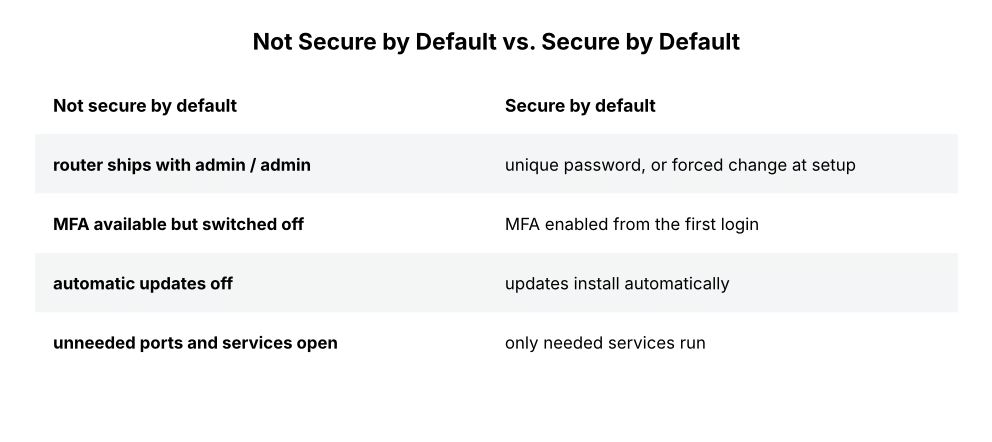
Secure by default is part of secure by design: security features should be enabled out of the box. Users should not have to find a settings menu to become safe.
| Not secure by default | Secure by default |
|---|---|
| A router ships with “admin / admin” as its login | Each router has a unique password, or forces a change at setup |
| MFA is available but switched off | MFA is enabled from the first login |
| Automatic updates must be turned on manually | Updates install automatically unless the user opts out |
| Unneeded services and ports are open | Only needed services run |
Remember the default-credential attacks from Topic 4.2, which try factory-default logins on routers and IoT devices. Secure by default removes the target entirely.
Input Sanitization
When users type into an application, the program typically wraps that input in special characters to process it. These are control characters, and they include the single quote, the double quote, and the semicolon. If an adversary slips control characters into their input, they can break out of the “wrapper” and make the application treat their text as instructions instead of data.
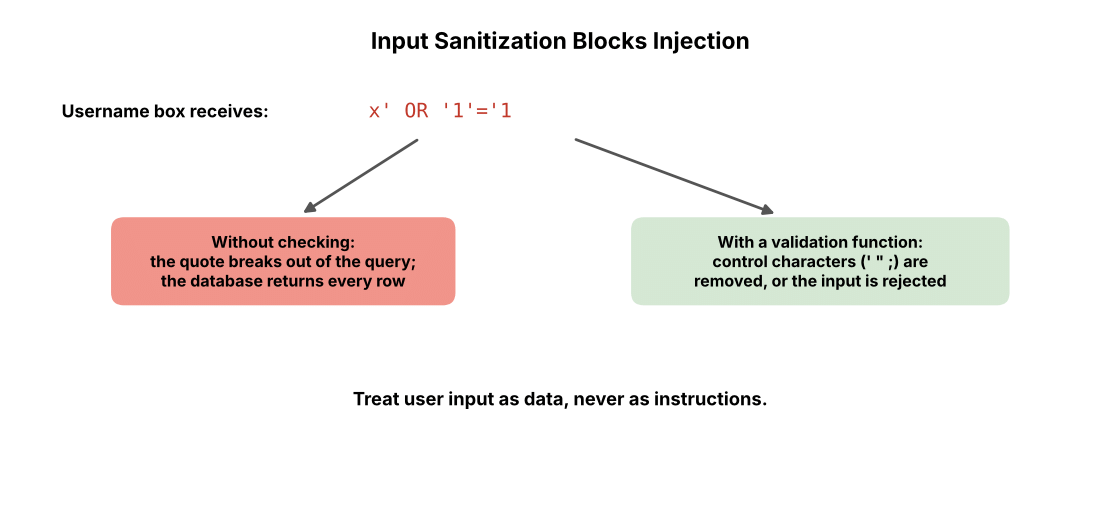
Programmers defend against this with a function that verifies user input before processing it. The function checks that input meets expected criteria and contains no control characters that could manipulate the system. It then does one of two things:
- Sanitize the input by removing potentially malicious characters, or
- Reject it with an error and require different input.
According to the CED, this protects against many application attacks, including:
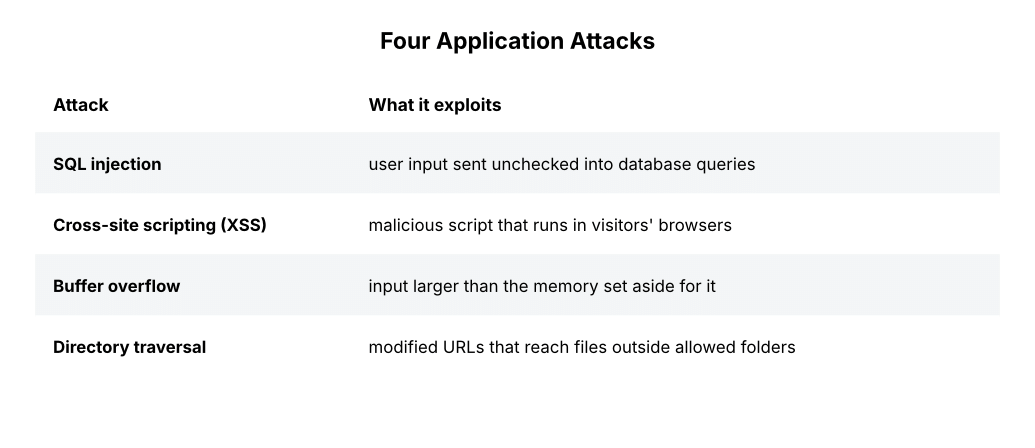
- SQL injection, which relies on control characters to alter database queries.
- Cross-site scripting (XSS), which relies on code being accepted as ordinary text.
- Directory traversal, which relies on unexpected path characters in requests.
Worked Example: Fixing a Library Search App
A school library’s catalog app lets students search by title. A security review finds three problems:
- The search box accepts any characters, including quotes and semicolons, and passes them to the database. Fix: Add a validation function that strips control characters or rejects the search with a friendly error.
- The admin page uses a default password printed in the vendor’s manual. Fix: Require a unique password at installation, which is secure by default.
- The vendor never told schools about a flaw found last year. Fix: Choose vendors that practice radical transparency and publish security updates promptly.
Each fix maps to a principle: input sanitization blocks injection, secure by default removes the default-credential risk, and transparency gets patches to customers quickly.
Why does this matter? Fixing security flaws after release is expensive and often too late. Building security in from the start prevents entire categories of attack.
Test-Taking Strategies
Mnemonic Devices and Memory Shortcuts
Secure by design: “Own it, Share it, Lead it.” Control characters: “quote, double quote, semicolon.” Sanitization outcomes: “Strip or reject.”
Cross-Topic Connections
- Topic 5.1: Application and Data Vulnerabilities and Attacks describes the injection attacks sanitization prevents.
- Topic 4.2: Authentication explains credential stuffing with default passwords.
- Topic 4.3: Protecting Devices covers patches and blocking unneeded services.
- AP® Computer Science Principles Topic 3.4: Strings explains how programs handle text and characters.
Common Question Formats
- A product practice asking whether it reflects secure by design or secure by default.
- A code-input scenario asking which control would prevent an attack.
- A question asking why control characters in input are dangerous.
Frequent Student Mistakes
- Treating secure by default as separate from secure by design. It is part of it.
- Thinking sanitization only matters for SQL injection. It also helps against XSS and directory traversal.
- Assuming a security feature that is available but off counts as secure by default.
Test-Day Shortcuts
If a question describes security enabled “out of the box,” pick secure by default. If it describes security built into planning and leadership, pick secure by design.
Time Management Tips
The AP Cybersecurity Exam on May 5, 2027, is fully digital in Bluebook. Mitigate Risk questions make up 25 to 40% of the multiple-choice section, and many ask for the single best control. Match the control to the root cause of the attack.
Check for Understanding
Think you’ve got it? Complete the quiz below to make sure. Download your results at the end.