
Maximize your score with these resources:
“Your account will be suspended in 2 hours unless you verify your identity. Click here now.” Messages like this arrive by the millions every day, and they work often enough to keep attackers sending them. Most successful cyberattacks do not start by cracking clever code. They start by tricking a person into handing over a password, a login code, or a click. Topic 1.1 opens AP Cybersecurity with that human weak point: social engineering.
This article covers Topic 1.1: Understanding Social Engineering in Unit 1, Introduction to Security. The topic asks you to identify common signs of social engineering, explain how its psychological tactics push victims to act, and describe what victims can lose.
By the end, you should be able to:
- Define social engineering and the channels attackers use.
- Recognize intimidation and urgency in a message.
- Explain why these tactics short-circuit careful thinking.
- Describe the possible impacts on victims, from leaked personal details to malware.
What Social Engineering Is
Social engineering attacks use psychological tactics to manipulate users into one of three actions:
- Revealing sensitive information, which the CED calls elicitation.
- Downloading a malicious file.
- Clicking a malicious link.
It can happen in person, but it most often arrives by email, text message, or social media message. In AP Cybersecurity, the person or group carrying out an attack is called an adversary.
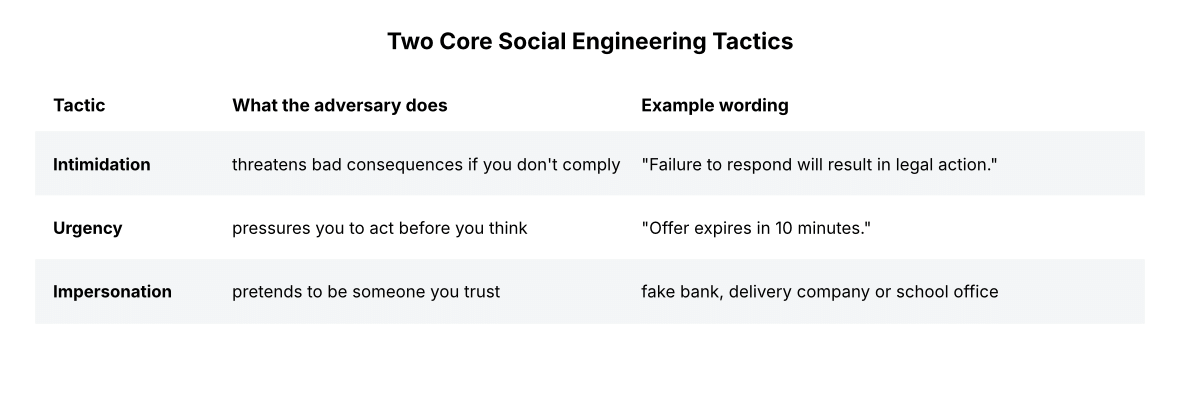
Two Core Tactics: Intimidation and Urgency
| Tactic | What the adversary does | Psychological principle it exploits | Example wording |
|---|---|---|---|
| Intimidation | Threatens negative consequences if the target does not comply | Our natural aversion to negative consequences; fear drives action | “Failure to respond will result in legal action.” |
| Urgency | Creates reasons the target must act quickly | Our tendency to react fast to time-sensitive needs | “Offer expires in 10 minutes.” |
Adversaries often pretend to be someone the target trusts, such as a bank, a delivery company, a coworker, or a school office. The disguise makes the threat or deadline feel believable, and it explains why so many messages copy real logos and familiar wording.
Both tactics work the same way underneath: they rush or frighten the target so they skip the step of asking whether the request is reasonable or safe. That pause is the best defense, which is exactly why attackers try to remove it.
Spotting the Indicators
Here is a message a student receives by text:
“SCHOOL IT ALERT: Suspicious activity detected on your student account. Your account and grades will be deleted TODAY unless you confirm your login. Reply with the 6-digit code we just sent you.”
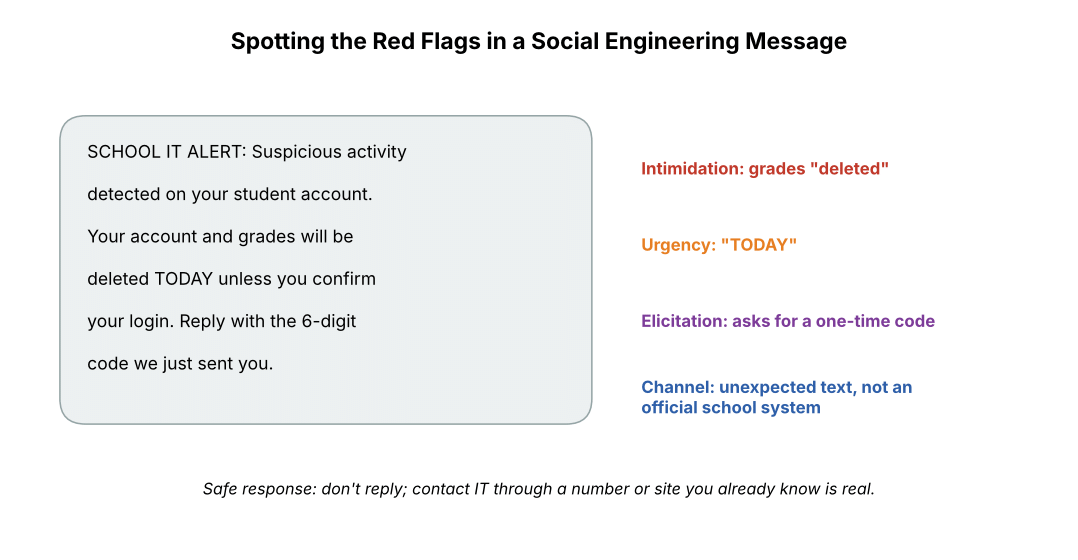
- Intimidation: the threat that the account and grades will be deleted.
- Urgency: “TODAY” pushes an immediate reply.
- Elicitation: it asks for a one-time code, which no legitimate IT department needs from you.
- Channel: an unexpected text, rather than an official school system.
Safe response: Do not reply or click. Contact the school’s IT office through a phone number or website you already know is real.
What Victims Can Lose
| What is given up | Why it is dangerous |
|---|---|
| Personal information: name, phone number, address, workplace, pets’ names, birthdate | Enables impersonation, and these details are often answers to website challenge questions used to verify identity |
| Secure information: a one-time password (OTP) or login code | Lets the adversary log in as the victim |
| A click or download | Can install malware, steal data saved in the web browser, or lead to a fake site that captures login credentials |
Why does this matter? Even small details matter. A pet’s name posted publicly might seem harmless, but if it is also the answer to “What was your first pet’s name?” it becomes a key to an account. Social engineering often combines many small leaks into one big breach.
Test-Taking Strategies
Mnemonic Devices and Memory Shortcuts
Remember “Scared or Rushed? Stop.” Intimidation scares, urgency rushes, and both are designed to stop you from stopping to think. For outcomes: “Info, Code, Click.”
Cross-Topic Connections
- AP® Computer Science Principles Topic 5.6: Safe Computing introduces phishing, malware, and personally identifiable information.
- AP® Computer Science Principles Topic 5.5: Legal and Ethical Concerns discusses privacy and the misuse of personal data.
- AP® Computer Science Principles Topic 4.1: The Internet explains the networks that carry malicious messages and links.
- The AP Cybersecurity score calculator shows how the multiple-choice and free-response sections combine into your score.
Common Question Formats
- A sample message asking which social engineering tactic it uses.
- A scenario asking what an adversary could do with a specific piece of information.
- A question asking why urgency makes a victim more likely to comply.
Frequent Student Mistakes
- Thinking social engineering only happens online. It can happen in person.
- Treating “harmless” personal details as safe to share.
- Confusing intimidation (a threat) with urgency (a deadline). Many messages use both.
Test-Day Shortcuts
Underline threat words like “suspended,” “legal,” or “deleted” for intimidation, and time words like “now,” “today,” or “expires” for urgency.
Time Management Tips
The AP Cybersecurity Exam on May 5, 2027, is fully digital in Bluebook. Section I has 60 multiple-choice questions in 80 minutes, worth 70% of your score, which is about 80 seconds per question. Message-analysis questions like these should take less, leaving time for scenario-heavy items.
Check for Understanding
Think you’ve got it? Complete the quiz below to make sure. Download your results at the end.