
Maximize your score with these resources:
When you log in to a website, the site checks your password, but a well-built site never actually stores your password. It stores a scrambled fingerprint of it instead. That way, if the database is stolen, adversaries get a list of fingerprints, not a list of passwords. Even so, weak passwords, reused passwords, and missing protections can still let adversaries in. Topic 4.2 explains how passwords are stored, how password attacks work, the factors used to prove identity, and the login settings that make devices safer.
This article covers Topic 4.2: Authentication in Unit 4, Securing Devices. The topic asks you to explain why hashes are used to store passwords, explain how password attacks exploit vulnerabilities, determine the type of authentication used, and configure secure login settings.
By the end, you should be able to:
- Describe cryptographic hash functions, their properties, and why salt matters.
- Distinguish online from offline password attacks and name common attack types.
- Classify authentication factors and explain multifactor authentication.
- Configure password complexity, length, age, history, and lockout settings.
Hashes and Password Storage
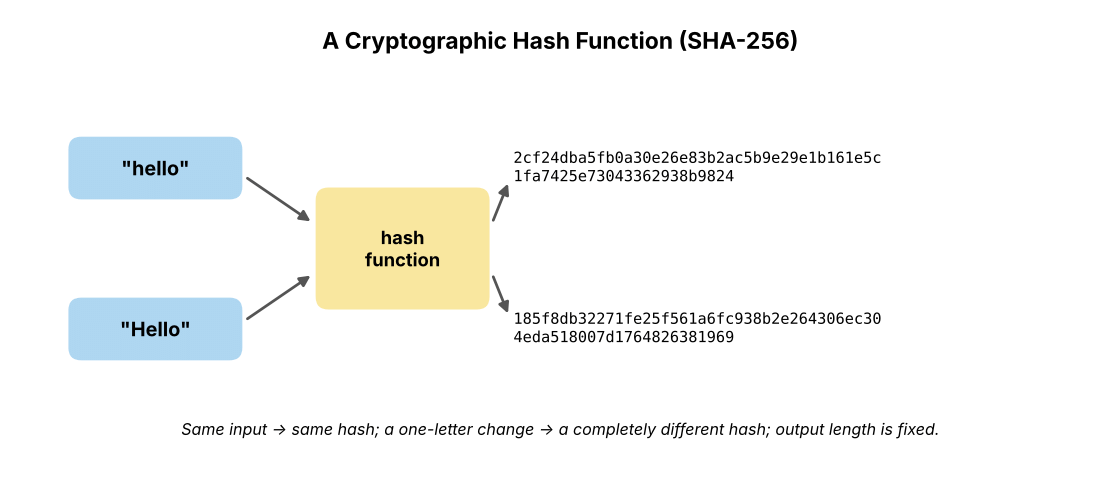
A cryptographic hash function takes binary data of any length and outputs a fixed-length binary string called a hash (also checksum, message digest, or digest). Well-known examples include MD5, SHA-1, SHA-256, SHA-512, NTHash, and RIPEMD-160.
| Property | Meaning |
|---|---|
| Collision resistant | Hard to find two inputs that produce the same hash |
| Pre-image resistant | Given a hash, infeasible to find the input |
| Repeatable | The same input always gives the same hash |
| Fixed length | Output length never changes, whatever the input size |
An n-bit hash has \(2^{n}\) possible outputs, but inputs are unlimited, so two inputs must eventually share a hash: a collision. If an efficient way to force collisions is found, the function is deprecated. MD5 and SHA-1 are deprecated.
How login works with hashes: The service stores each password’s hash, not the password. At login, it hashes what you typed and compares. A match means you are authenticated. To keep two users with the same password from having identical hashes, the system adds salt, a few unique random bits per user, before hashing.
Password Attacks
If an adversary gets a legitimate user’s password and the organization lacks MFA, the adversary can do everything that user can do.
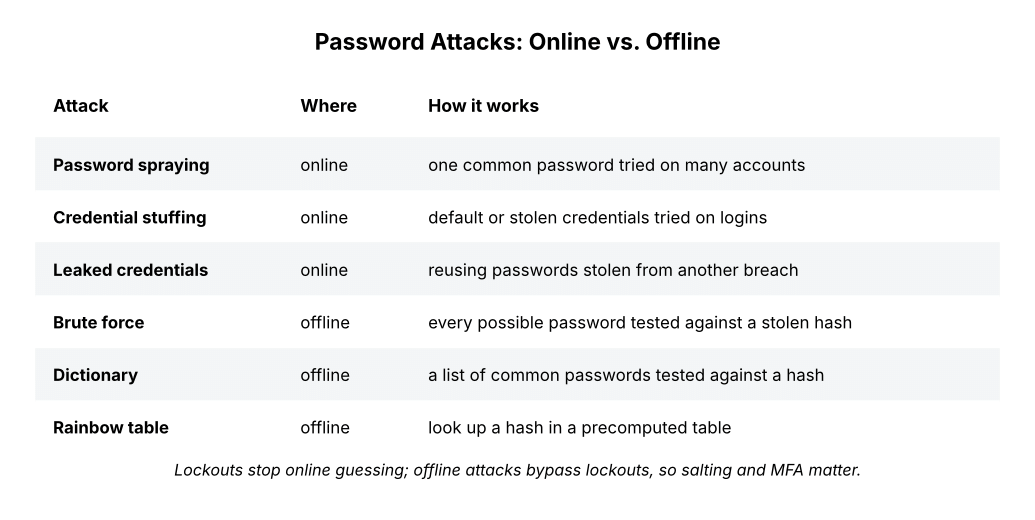
| Attack | Online or offline | How it works |
|---|---|---|
| Leaked credentials | Online | Trying a user’s credentials stolen from another breach, exploiting password reuse |
| Password spraying | Online | Trying one common password against many accounts |
| Credential stuffing | Online | Trying default credentials (common on routers, switches, IoT devices) or stolen credentials |
| Brute force | Offline | Testing every possible password against a captured hash |
| Dictionary | Offline | Testing a list of common passwords against a captured hash |
| Rainbow table | Offline | Looking up a captured hash in a precomputed, sorted table of passwords and hashes |
Online attacks work against a live login portal. Offline attacks run against a stolen password database on the adversary’s own computer, which bypasses account lockouts. Hashes cannot be reversed, but offline tools hash many guesses and look for a match. Salt makes precomputed rainbow tables far less useful, because each user’s hash depends on unique random bits.
Authentication Factors
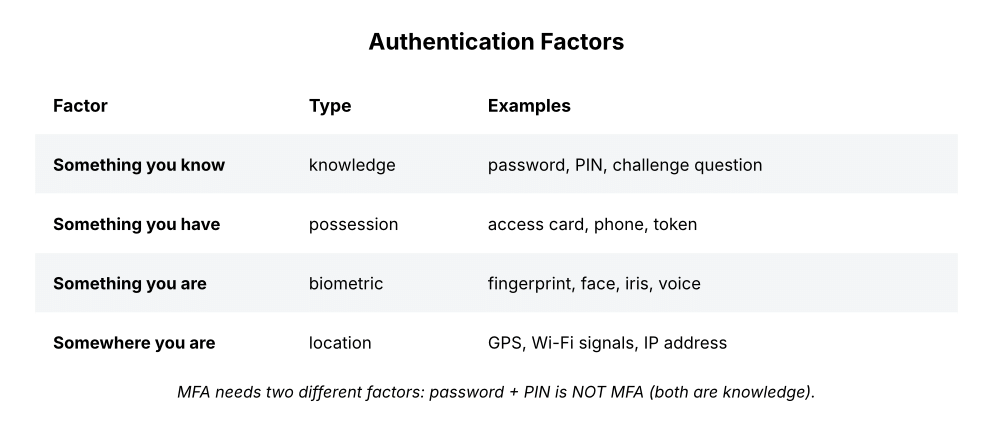
| Factor | Type | Examples |
|---|---|---|
| Something you know | Knowledge | Password, PIN, challenge question |
| Something you have | Possession | Access card, bank card, phone, token |
| Something you are | Biometric | Fingerprint, face, iris or retina, voice |
| Somewhere you are | Location | GPS, Wi-Fi signals, time zone, IP address |
Multifactor authentication (MFA) requires at least two separate factors. A password plus a code sent to your phone is MFA (knowledge plus possession). A password plus a PIN is not, because both are knowledge factors.
Secure Login Settings
| Setting | What it does |
|---|---|
| Complexity | Requires uppercase, lowercase, digits, and special characters |
| Minimum length | Longer passwords take longer to crack |
| Maximum age | Forces changes, often every 90 or 120 days; some national standards advise against routine changes because users fall into patterns like “PasswordFall2028” |
| Password history | Stores previous hashes, often 5 to 10, to block reuse |
| Lockout | Locks the account after a few invalid attempts, often 3 to 5 |
Why does this matter? Lockouts stop online guessing, salt weakens rainbow tables, and MFA protects accounts even when a password leaks. Each defense blocks a different attack, which is defense in depth again.
Test-Taking Strategies
Mnemonic Devices and Memory Shortcuts
Factors: “Know, Have, Are, Where.” Hash properties: “Can’t Predict, Can’t Reverse, Repeats, Rigid length.” Spraying = one password, many users.
Cross-Topic Connections
- Topic 1.2: Suspicious Website Logins introduces online password attacks and strong passwords.
- Topic 4.1: Device Vulnerabilities and Attacks covers weak authentication as a device vulnerability.
- Topic 1.4: AI-Based Cybersecurity Attacks explains why MFA matters against voice cloning.
- AP® Computer Science Principles Topic 2.1: Binary Numbers explains why n bits allow 2 to the n values.
Common Question Formats
- An attack description asking which password attack it is.
- A login process asking which factors are used and whether it is MFA.
- A policy goal asking which login setting meets it.
Frequent Student Mistakes
- Thinking hashes can be decrypted. They are one-way.
- Calling two knowledge factors MFA.
- Assuming lockouts stop offline attacks. Offline attacks never touch the login portal.
Test-Day Shortcuts
Ask “Is the adversary using the live login page?” If yes, it is online, and lockouts help. If they have the database, it is offline, and salt and strong passwords matter most.
Time Management Tips
The AP Cybersecurity Exam on May 5, 2027, is fully digital in Bluebook. The Device Security Analysis question can include security policies and log files, so practice comparing a device’s login settings against a written policy.
Check for Understanding
Think you’ve got it? Complete the quiz below to make sure. Download your results at the end.