
Maximize your score with these resources:
You sit down at a coffee shop and open your laptop. Two networks appear: “BeanCafe_WiFi” and “BeanCafe-WiFi.” One belongs to the café. The other might belong to the person two tables over. Public Wi-Fi is convenient, but it is also one of the easiest places for an adversary to watch, block, or fake network traffic. Topic 1.3 covers who attacks networks, three common wireless attacks, and the habits that keep your data safer on public networks.
This article covers Topic 1.3: Best Practices for Public Networks in Unit 1, Introduction to Security. The topic asks you to identify the type of adversary behind an attack, identify types of wireless attacks, and describe actions individuals can take to protect sensitive data on the internet and Wi-Fi.
By the end, you should be able to:
- Classify adversaries by skill level and describe their motivations.
- Explain evil twin, jamming, and war driving attacks.
- Define denial of service and explain how jamming causes it.
- Recommend safe practices for public Wi-Fi, including VPN trade-offs.
Who Are the Adversaries?
| Skill level | Tools | Vulnerabilities targeted |
|---|---|---|
| Low-skilled | Malicious tools created by others and bought online | Known vulnerabilities |
| High-skilled | Create new tools or modify existing ones to get around defenses | Can discover undocumented vulnerabilities, called zero days |
Adversaries’ motivations include greed, a desire for recognition, dedication to a cause, revenge, politics, or beliefs. Knowing the likely motive helps defenders guess what an adversary wants: money, attention, disruption, or information.
Why does this matter? Defending against known vulnerabilities, for example by installing updates, stops most low-skilled adversaries. Zero days are harder, because no fix exists yet when they are first used.
Three Wireless Attacks
| Attack | How it works | Result |
|---|---|---|
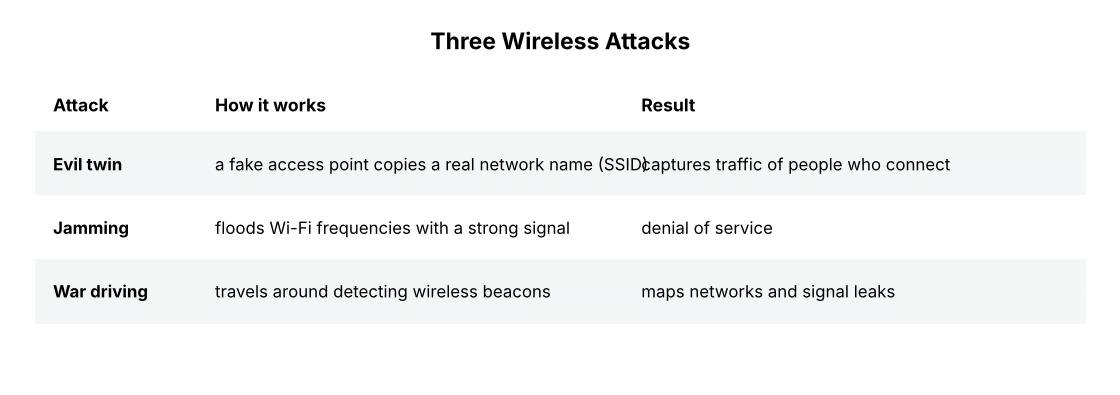
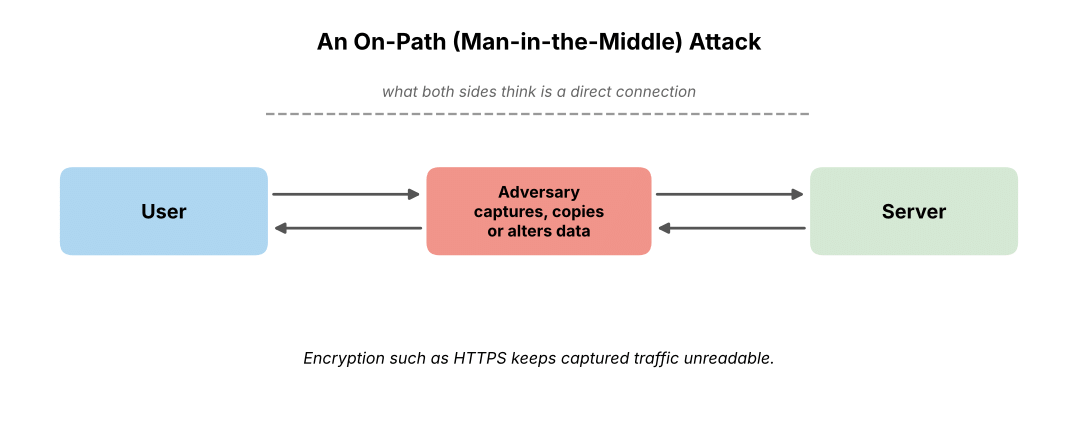
| Evil twin | The adversary sets up a wireless access point (WAP) with a network name, or SSID, similar or identical to a real one | Victims who connect to it let the adversary capture their traffic, though encrypted traffic such as HTTPS cannot be read |
| Jamming | The adversary floods the area with a strong electromagnetic signal on the same frequencies as the Wi-Fi network | Legitimate traffic between the access point and users is blocked: a denial of service (DoS) |
| War driving | The adversary drives or walks around a target detecting wireless network beacons | Learns what type of network is used and where the signal leaks outside the building |
A denial of service (DoS) attack is any attack that prevents users from accessing resources. Jamming is a physical way to cause one.
Protecting Yourself on Public Networks
- Verify the network name. Make sure it exactly matches the network you meant to join. Ask staff if you are unsure.
- Consider data sensitivity. Most internet protocols, like HTTPS, are encrypted. But some data, such as DNS queries (the lookups that turn website names into addresses), may be visible on unencrypted Wi-Fi. Weigh how sensitive your activity is before joining an open network.
- Consider a VPN. A virtual private network encrypts all your traffic to the VPN operator’s system, so the Wi-Fi or internet service provider cannot view it. The trade-off: the VPN provider can view your traffic, so you are shifting trust, not removing it.
Worked Example: Diagnosing a Café Network Problem
A café owner reports three issues in one week:
- Customers say a second network named “BeanCafe_WiFi” appeared, nearly identical to the café’s real “BeanCafe-WiFi.”
- On Saturday afternoon, no one could connect at all for 30 minutes, though the router showed no errors.
- A neighbor saw someone sitting in a parked car outside with a laptop and antenna.
- First issue: an evil twin. Customers on it could have unencrypted traffic captured.
- Second issue: likely jamming, a denial of service caused by signal interference rather than a router fault.
- Third issue: consistent with war driving, mapping where the café’s signal reaches outside.
- Recommendation: Post the exact network name at the register, and remind customers to use encrypted sites or a trusted VPN.
Test-Taking Strategies
Mnemonic Devices and Memory Shortcuts
Three wireless attacks, three verbs: evil twin copies, jamming blocks, war driving maps. For adversaries: “Low skill buys; high skill builds.”
Cross-Topic Connections
- Topic 1.1: Understanding Social Engineering covers attacks that target people rather than networks.
- Topic 1.2: Suspicious Website Logins explains what adversaries can do with captured credentials.
- AP® Computer Science Principles Topic 4.1: The Internet explains protocols, packets, and DNS.
- AP® Computer Science Principles Topic 4.2: Fault Tolerance covers how networks keep working when parts fail.
Common Question Formats
- A scenario asking which wireless attack is described.
- An adversary description asking whether it is low- or high-skilled.
- A question asking what a VPN does and does not protect.
Frequent Student Mistakes
- Thinking an evil twin can read all traffic. HTTPS traffic stays encrypted.
- Believing a VPN makes your traffic private from everyone. The VPN provider can see it.
- Confusing war driving (reconnaissance) with jamming (disruption).
Test-Day Shortcuts
If users cannot connect at all, think jamming or DoS. If they connect but to the wrong place, think evil twin. If nothing is disrupted but someone is scanning, think war driving.
Time Management Tips
The AP Cybersecurity Exam on May 5, 2027, is fully digital in Bluebook, with 60 multiple-choice questions in 80 minutes. Analyze Risk is one of three skill categories, each weighted 25 to 40% of the multiple-choice section, so attack-identification questions are worth practicing until they feel automatic.
Check for Understanding
Think you’ve got it? Complete the quiz below to make sure. Download your results at the end.