
Maximize your score with these resources:
Every computer keeps a diary. It records who logged in and when, which programs started, which settings changed, and which files appeared. Most days, that diary is boring. But when something goes wrong, it becomes the most important evidence an investigator has. A new file in an odd folder, a login from another country at 4 a.m., or a user suddenly trying to become an administrator can all reveal an intruder. Topic 4.4 teaches you how to find those clues on a device and how to choose detection tools that fit the device.
This article covers Topic 4.4: Detecting Attacks on Devices in Unit 4, Securing Devices. The topic asks you to explain how to detect attacks against devices, determine and evaluate detection controls, and identify indicators of password attacks in log files.
By the end, you should be able to:
- Define an indicator of compromise and name host-based, file-based, and behavior-based IoCs.
- Choose a device detection method based on performance, cost, and sensitivity.
- Evaluate detection methods by speed, attack phase, false positives, and ease of bypass.
- Spot online password attacks, password spraying, and credential stuffing in auth logs.
Logs and Indicators of Compromise
Devices log system processes and settings, login attempts, file downloads, and user actions. These logs let defenders reconstruct what happened before and during an incident. An indicator of compromise (IoC) is evidence that an adversary has compromised a device or network. Authentication logs (auth logs) record every attempted login.
| IoC type | Where to look | Examples |
|---|---|---|
| Host-based | Auth logs, user activity logs, configuration files | Unusual files created or modified; unexpected processes or services; unauthorized configuration changes; unauthorized software installs or updates |
| File-based | Files on the device, usually executables | A file whose hash matches known malware; file names known to be created by malware; file paths linked to malicious activity |
| Behavior-based | Auth and access logs | Multiple failed logins; unusual login times or locations; unauthorized attempts to access sensitive data; attempts to elevate privileges |
Choosing Device Detection Controls
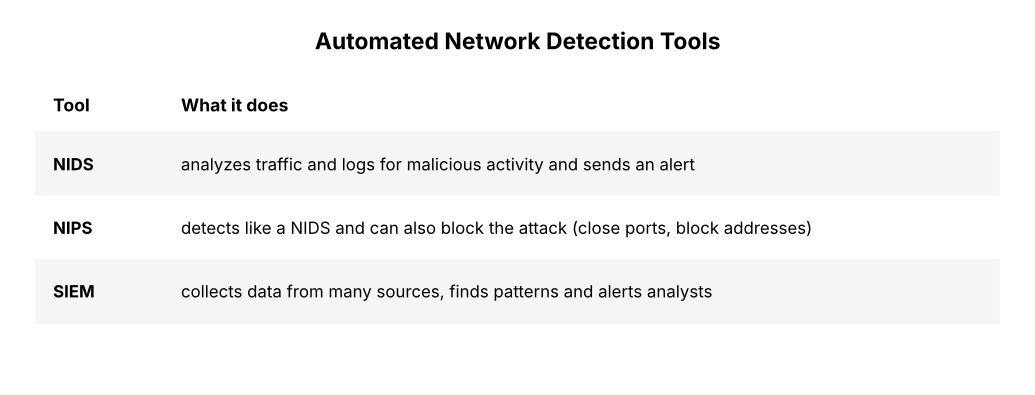
- Performance: Detection tools use memory and processing power. Anomaly-based tools use more than signature-based tools, so signature-based fits less powerful devices. Many embedded devices cannot run detection tools at all.
- Cost: Organizations must buy licenses for every device. Some purchase an endpoint detection and response (EDR) service from a vendor: expensive, but a unified approach with a centralized alert platform.
- Sensitivity or criticality: Devices holding sensitive data or running critical services are bigger targets and benefit from hybrid detection when possible.
Evaluating Detection Methods
| Factor | Key point |
|---|---|
| Speed and performance | Signature-based is faster, especially on devices with limited processing power; heavy tools can slow a device |
| Phase of the attack | By the device stage, an adversary has already passed physical and network controls; stopping them here can still protect sensitive data and critical services |
| False positives vs. bypass | Most device tools are signature-based: few false positives, but easier for adversaries to bypass |
Reading Auth Logs for Password Attacks
| Attack | Log pattern |
|---|---|
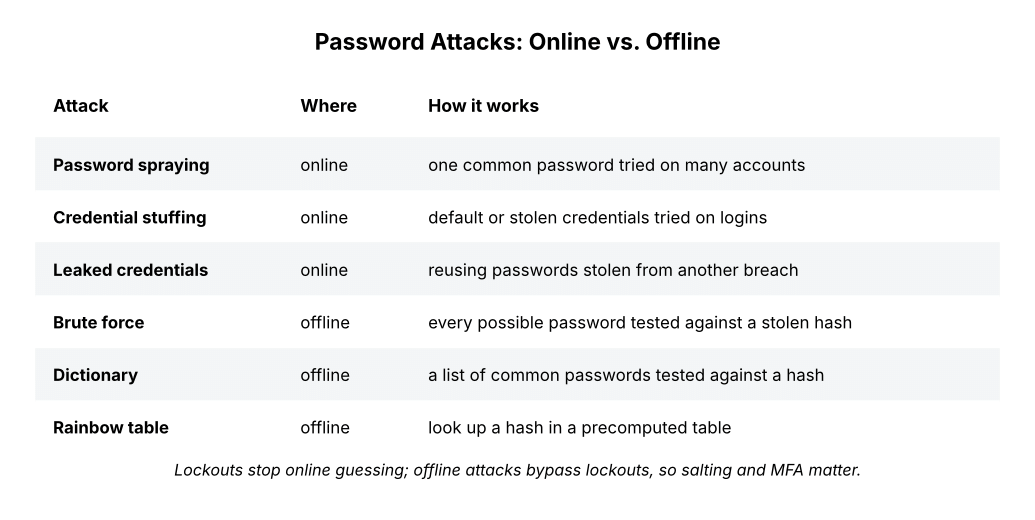
| Online password attack | One user, many wrong passwords |
| Compromised password | An authorized user logging in from an unexpected location, IP address, or time |
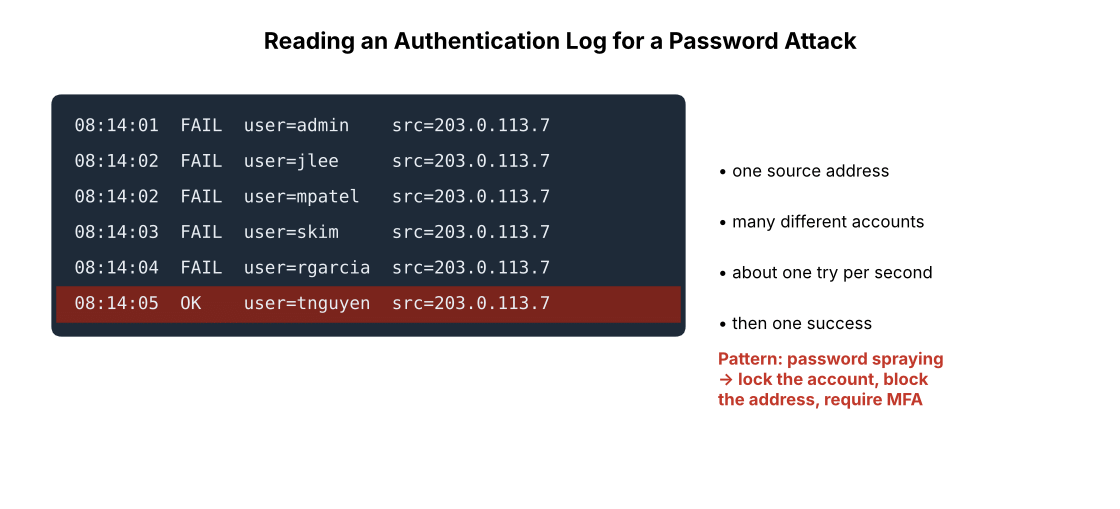
| Password spraying | Many different users attempting logins within seconds of each other, from one IP or unusual IPs |
| Credential stuffing | A rapid series of default user:password combinations, often from the same IP |
| Offline password attack | Cannot be detected: it happens on the adversary’s computer |
If a user:password hash database is compromised, treat every password in it as insecure and force all users to reset.
Worked Example: Analyzing an Auth Log
| Time | User | Source IP | Result |
|---|---|---|---|
| 02:14:01 | akim | 203.0.113.9 | Failed |
| 02:14:02 | bsoto | 203.0.113.9 | Failed |
| 02:14:03 | cpark | 203.0.113.9 | Failed |
| 02:14:04 | dlee | 203.0.113.9 | Success |
| 02:20:40 | dlee | 203.0.113.9 | Privilege change attempted |
- Pattern: Different users, one IP address, one second apart, in the middle of the night. That is password spraying.
- Compromise: dlee’s account was breached with a common password.
- Escalation: The privilege change attempt is a behavior-based IoC that the adversary is attempting privilege escalation.
- Response: Lock dlee’s account, reset the password, require MFA, and block 203.0.113.9.
Why does this matter? The Device Security Analysis free-response question asks you to detect evidence of attacks in sources like log files and cite that evidence. Naming the pattern and pointing to specific lines is exactly the skill.
Test-Taking Strategies
Mnemonic Devices and Memory Shortcuts
“One user, many passwords = guessing; many users, one password = spraying; default pairs = stuffing.” IoC types: “Host, File, Behavior.”
Cross-Topic Connections
- Topic 4.2: Authentication defines spraying, stuffing, and offline attacks.
- Topic 3.5: Detecting Network Attacks compares signature, anomaly, and hybrid detection.
- Topic 4.3: Protecting Devices covers anti-malware that matches file hashes.
- Topic 2.1: Cyber Foundations describes lateral movement and evading detection by editing logs.
Common Question Formats
- An auth log asking which password attack it shows.
- A finding asking whether it is a host-, file-, or behavior-based IoC.
- A device profile asking which detection approach fits.
Frequent Student Mistakes
- Saying offline attacks appear in auth logs. They do not.
- Confusing spraying (many users) with guessing (one user).
- Recommending anomaly-based tools for low-powered embedded devices.
Test-Day Shortcuts
Sort a log by column in your head: if the user column changes and the IP stays the same, think spraying; if the user stays the same and passwords keep failing, think an online guessing attack.
Time Management Tips
The AP Cybersecurity Exam on May 5, 2027, is fully digital in Bluebook. You have 50 minutes for the single free-response question. Spend the first few minutes reading every source, then answer each part with a specific log line as evidence.
Check for Understanding
Think you’ve got it? Complete the quiz below to make sure. Download your results at the end.