
Maximize your score with these resources:
Not every file deserves the same protection. A cafeteria menu can be shared with anyone. Student health records, credit card numbers, and the source code for a new product cannot. Organizations decide how much protection data needs based on how sensitive it is, what laws apply, and whether it is sitting on a drive, moving across a network, or being used. Then they decide exactly who may read, change, or run each file. Topic 5.2 covers data classification, data security policies, access control models, and how to set file permissions on a Linux system.
This article covers Topic 5.2: Protecting Applications and Data: Managerial Controls and Access Controls in Unit 5, Securing Applications and Data. The topic asks you to explain how data state and classification affect security, identify managerial controls, choose an access control model, and configure Linux access controls.
By the end, you should be able to:
- Protect data at rest, in transit, and in use, and identify PII, PHI, and PCI.
- Describe cryptography and web application security policies.
- Compare RBAC, RuBAC, DAC, and MAC, including the Bell-LaPadula model.
- Read and set Linux permissions with numeric and symbolic chmod.
Data States and Regulated Data
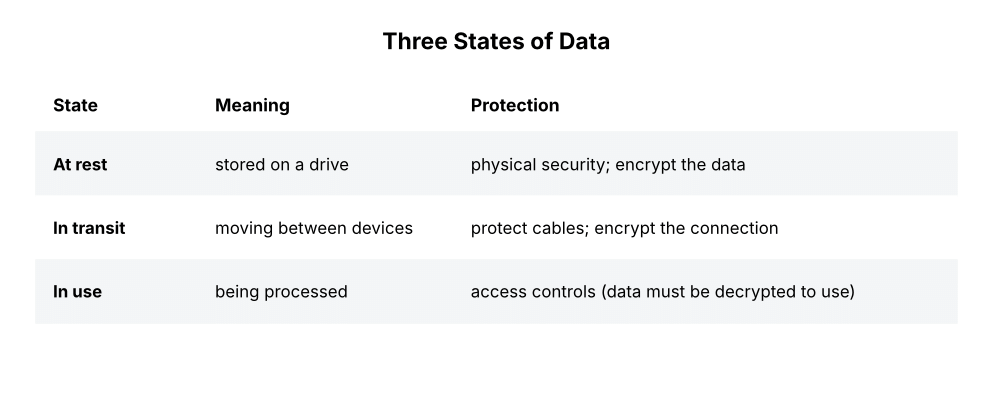
| State | Meaning | Protection |
|---|---|---|
| At rest | Stored on a drive | Protect the drive physically; encrypt the data |
| In transit | Moving between devices | Protect cables and media; encrypt the data |
| In use | Being processed by software or a person | Access controls limit who can view or edit; data must be unencrypted to be used |
Organizations categorize data by sensitivity and give more sensitive data more protection. Laws and regulations set rules for some types:
- PII (personally identifiable information): name, signature, phone, address, biometrics, Social Security number, birth date, email. Protected by laws including the Privacy Act of 1974 and, for children under 13, the Children’s Online Privacy Protection Act of 1998.
- PHI (protected health information): test results, treatment and hospital records, doctor notes, health payment records. Covered by HIPAA (1996).
- PCI (payment card information): name, account number, expiration date, address, CVV. Regulated by PCI-DSS.
Managerial Controls
- A cryptography policy lists approved encryption algorithms, minimum or maximum key lengths, and key-generation and key-storage requirements.
- A web application security policy sets when applications get security assessments, how they are carried out, and deadlines for fixing vulnerabilities based on risk.
Access Control Models
Access control decides which subjects (users or applications) may perform which operations (access, modify, add, remove) on which objects (files or applications).
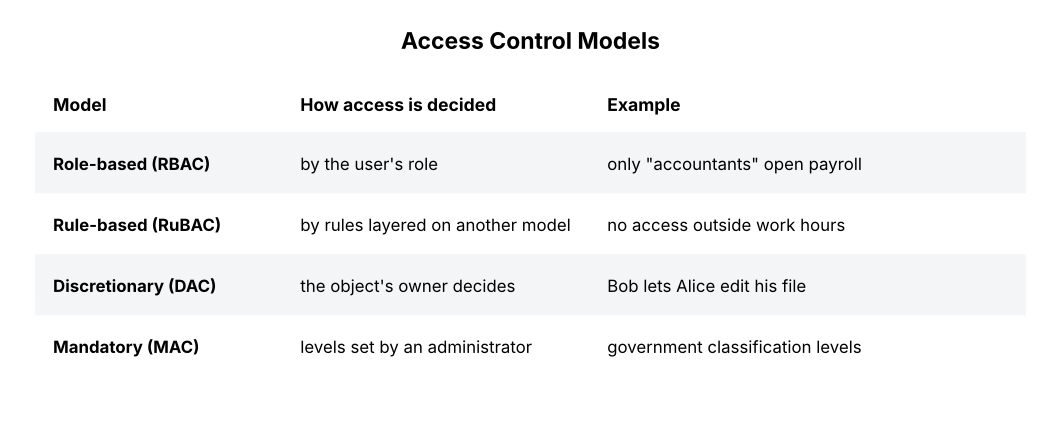
| Model | How access is decided | Example |
|---|---|---|
| Role-based (RBAC) | By the subject’s assigned role | Only “accountants” can open payroll software |
| Rule-based (RuBAC) | By a set of rules, usually layered on another model | No database access outside local working hours, even for authorized users |
| Discretionary (DAC) | Object owners set others’ access; administrators can override | Bob lets Alice edit his file, lets Frank view it, and blocks everyone else |
| Mandatory (MAC) | Strict rules based on levels assigned by an external administrator | Government classification levels |
The Bell-LaPadula model is a MAC model used by governments and militaries. Its Simple Security Property says subjects may not read up. Its Star (*) Security Property says subjects may not write down. Together: “write up, read down” (WURD). This keeps secret information from leaking to lower levels.
Across every model, follow the principle of least privilege: give exactly the access needed for a job, and no more.
Linux File Permissions
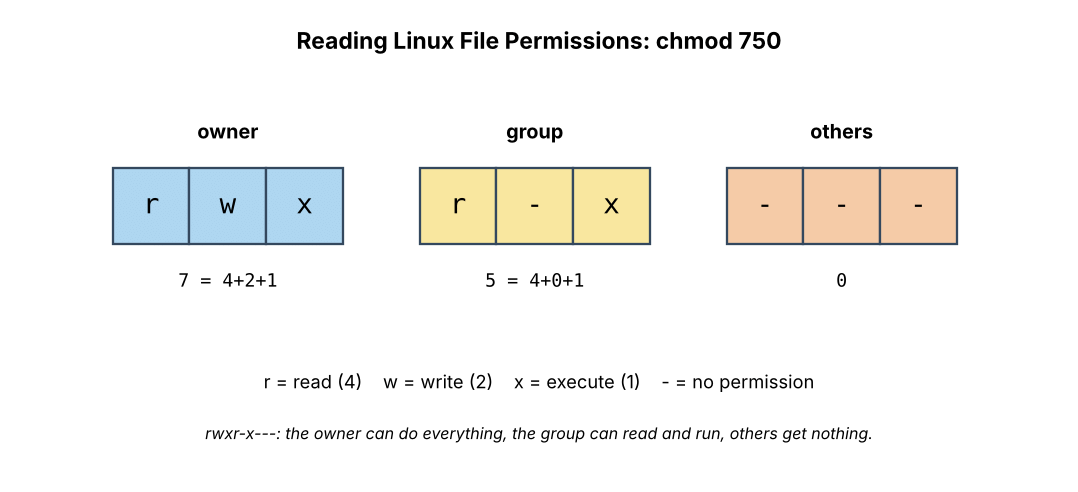
Authorization grants an entity a specific type of access. In Linux, each file has three permissions in this order: read, write, execute. A dash means the permission is absent, so r-x is read and execute only. Permissions are set for three entities in order: owner, group, others, shown together, such as rwxr-x---.
ls -lshows current permissions. A+at the end means extra permissions exist, viewable withgetfacl.chmodchanges permissions.
Numeric method: add read = 4, write = 2, execute = 1 for each entity.
| Digit | Permissions |
|---|---|
| 7 | rwx (\(4+2+1\)) |
| 6 | rw- (\(4+2\)) |
| 5 | r-x (\(4+1\)) |
| 4 | r– |
| 0 | — |
chmod 750 test gives the owner rwx, the group r-x, and others nothing.
Symbolic method: chmod + entity (u, g, o, or a) + plus or minus + permission (r, w, x). For example, chmod ug+rx testfile adds read and execute for the owner and group.
Worked Example: Locking Down a Grades File
A teacher owns grades.csv. The teacher must read and edit it, the “counselors” group may only read it, and no one else may access it. Applying least privilege:
- Owner: read + write = \(4+2=6\).
- Group: read = 4.
- Others: none = 0.
- Command:
chmod 640 grades.csv, which displays asrw-r-----.
Because the file holds student PII, this is also RBAC in practice: access follows each person’s role.
Why does this matter? The Device Security Analysis question may include file-system permissions and ask how a change would affect users. Converting between numbers and rwx strings quickly is essential.
Test-Taking Strategies
Mnemonic Devices and Memory Shortcuts
Permissions: “4 Read, 2 Write, 1 eXecute” and entities “Owner, Group, Others.” Bell-LaPadula: “WURD: Write Up, Read Down.”
Cross-Topic Connections
- Topic 5.1: Application and Data Vulnerabilities and Attacks explains the risks of weak access controls.
- Topic 4.2: Authentication covers proving identity before authorization.
- Topic 4.3: Protecting Devices describes other managerial policies.
- AP® Computer Science Principles Topic 5.5: Legal and Ethical Concerns discusses privacy laws and personal data.
Common Question Formats
- A permission string asking what a group can do.
- A requirement asking which chmod command meets it.
- A scenario asking which access control model is in use.
Frequent Student Mistakes
- Reading the permission order wrong. It is always owner, group, others.
- Reversing WURD into “read up.”
- Confusing RBAC (roles) with RuBAC (rules).
Test-Day Shortcuts
Convert each rwx triplet to a digit by adding 4, 2, and 1 for each letter present. Three digits, three entities, done.
Time Management Tips
The AP Cybersecurity Exam on May 5, 2027, is fully digital in Bluebook. Free-response task verbs include “Write,” which asks for a proper command. Practice writing chmod commands in both numeric and symbolic forms.
Check for Understanding
Think you’ve got it? Complete the quiz below to make sure. Download your results at the end.