
Maximize your score with these resources:
If a laptop is stolen from a car, what happens to the files on it? If the drive is unencrypted, the thief can plug it into another computer and read everything: tax returns, photos, client lists. If the drive is encrypted, the thief gets a pile of scrambled bits that are useless without the key. Encryption is the last line of defense for stored data, because it protects information even after every other control has failed. Topic 5.3 explains how encryption works, how algorithms are classified, and how to use AES, the world’s most common symmetric cipher.
This article covers Topic 5.3: Protecting Stored Data with Cryptography in Unit 5, Securing Applications and Data. The topic asks you to explain how encryption protects files and to apply symmetric encryption algorithms to encrypt and decrypt data.
By the end, you should be able to:
- Define cryptography, encryption, decryption, plaintext, ciphertext, and keyspace.
- Distinguish symmetric from asymmetric and block from stream encryption.
- Describe AES, its block size, and the trade-off of longer keys.
- Read OpenSSL commands that encrypt and decrypt a file with AES.
Core Vocabulary
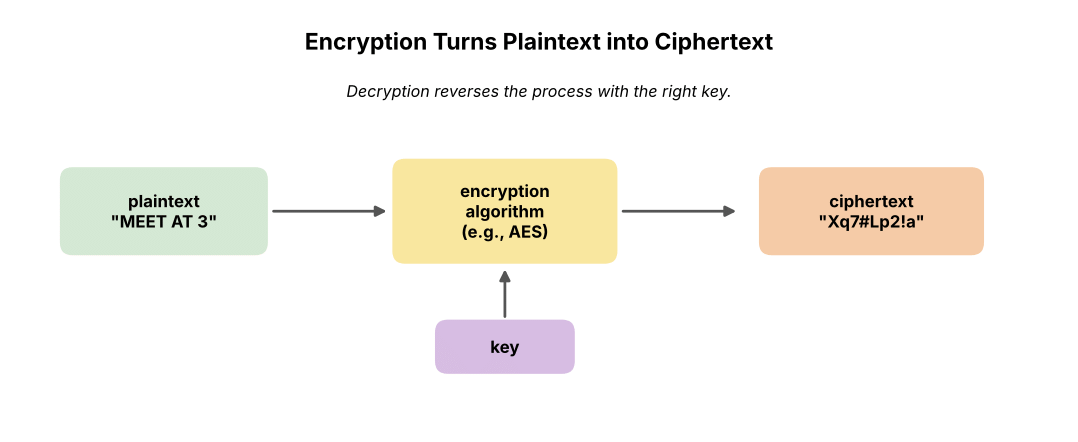
| Term | Meaning |
|---|---|
| Cryptography | The practice of hiding information |
| Cryptographic algorithm | A defined process for encrypting and decrypting |
| Encryption / decryption | Hiding information / reversing the process to recover it |
| Plaintext | The original, readable information |
| Key | The value combined with plaintext by the algorithm |
| Ciphertext | The encrypted output |
| Keyspace | The number of possible keys; a larger keyspace takes longer to search |
How Algorithms Are Classified
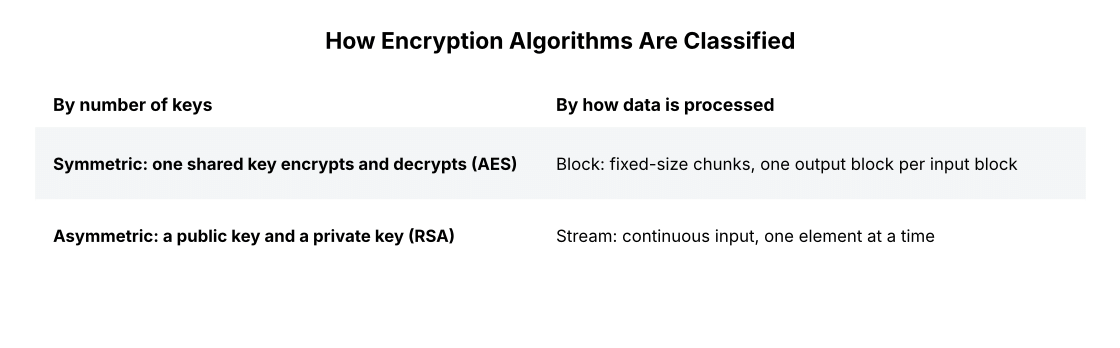
| By number of keys | By how data is processed |
|---|---|
| Symmetric: the same key encrypts and decrypts | Block: fixed-size chunks (blocks), one output block per input block |
| Asymmetric: two different keys, one to encrypt and the other to decrypt | Stream: continuous input, output one element at a time |
AES: The Standard Symmetric Cipher
Computer encryption works on binary data. The most common symmetric algorithm is the Advanced Encryption Standard (AES), used to secure Wi-Fi transmissions, web browsing, disk file encryption, and hardware-level encryption in processors.
- AES is a symmetric block cipher that encrypts data in 128-bit blocks (16 bytes).
- It supports different key lengths. Longer keys are more secure but take more time to encrypt and decrypt.
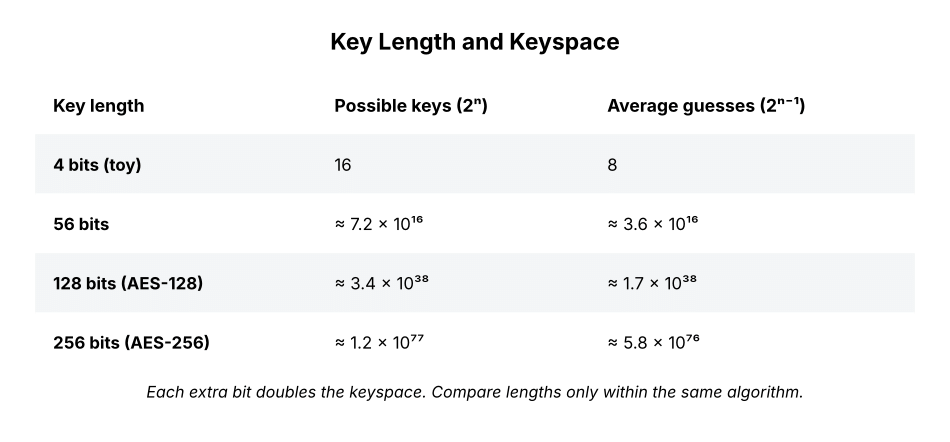
Why key length matters: A 128-bit key has a keyspace of \(2^{128}\approx 3.4\times 10^{38}\) possible keys. Every additional bit doubles the keyspace, so a 256-bit key has \(2^{128}\) times as many possibilities as a 128-bit key.
Encrypting and Decrypting with OpenSSL
Symmetric encryption can be done on the command line, with specialized software such as the open-source tool AES Crypt, or with web-based tools. The CED shows these OpenSSL commands, where the key is derived from the password given after -k:
Encrypt a file named test with 128-bit AES:
openssl enc -aes-128-cbc -e -in test -k password -out test.enc
Decrypt it with the same key:
openssl enc -aes-128-cbc -d -in test.enc -k password -out text
| Part | Meaning |
|---|---|
enc |
Use OpenSSL’s symmetric encryption tool |
-aes-128-cbc |
Use AES with a 128-bit key |
-e / -d |
Encrypt / decrypt |
-in / -out |
Input file / output file |
-k password |
The password the key is derived from |
Because AES is symmetric, the same password must be used for both commands. Anyone who knows it can decrypt the file, so it must be shared only with people who should have access, through a secure channel.
Worked Example: Protecting a Stolen-Laptop Risk
A small accounting firm’s employees carry laptops holding client tax files, which contain PII. Topic 5.1 would rate unencrypted sensitive data on portable devices as high risk.
- Choose the protection: Encrypt data at rest using AES.
- Choose key length: The firm’s cryptography policy (Topic 5.2) requires a minimum key length. A 256-bit key gives a far larger keyspace than 128 bits, at a small cost in speed.
- Protect the key: Store the password or key separately from the laptop, never on a sticky note in the laptop bag.
- Result: If a laptop is stolen, the thief sees only ciphertext. The incident becomes a lost device, not a data breach.
Why does this matter? Symmetric encryption is fast and strong, but it has one weakness: both parties need the same key. Topic 5.4 shows how asymmetric encryption solves the problem of sharing keys safely.
Test-Taking Strategies
Mnemonic Devices and Memory Shortcuts
“Symmetric = Same key.” AES facts: “Symmetric, Block, 128-bit blocks.” Longer key = “safer but slower.”
Cross-Topic Connections
- Topic 5.2: Protecting Applications and Data covers data at rest and the cryptography policy.
- Topic 5.1: Application and Data Vulnerabilities and Attacks rates unencrypted data as a risk.
- Topic 3.2: Protecting Networks: Managerial Controls and Wireless Security requires AES for wireless traffic.
- AP® Computer Science Principles Topic 2.1: Binary Numbers explains why each added bit doubles the number of values.
Common Question Formats
- A description asking whether an algorithm is symmetric or asymmetric, block or stream.
- An OpenSSL command asking what it does.
- Two key lengths asking which keyspace is larger and by how much.
Frequent Student Mistakes
- Confusing AES’s 128-bit block size with its key length.
- Using a different password to decrypt than to encrypt.
- Thinking encryption protects data while it is being used. Data must be decrypted to be used.
Test-Day Shortcuts
In an OpenSSL command, find -e or -d first to know the direction, then read -in and -out to see which file is plaintext and which is ciphertext.
Time Management Tips
The AP Cybersecurity Exam on May 5, 2027, is fully digital in Bluebook, with 60 multiple-choice questions in 80 minutes. Command-reading questions reward a quick, systematic scan of each flag rather than rereading the whole command.
Check for Understanding
Think you’ve got it? Complete the quiz below to make sure. Download your results at the end.