
Maximize your score with these resources:
A firewall works like a security desk in a building lobby with a printed list of rules: delivery drivers may go to the mailroom, employees may go upstairs, and everyone else is turned away. The guard reads the list from the top and follows the first rule that fits. Put the rules in the wrong order and the guard might turn away employees or wave in strangers. Topic 3.4 covers the types of firewalls, how their rule lists work, where firewalls belong, and how to configure them correctly.
This article covers Topic 3.4: Protecting Networks: Firewalls in Unit 3, Securing Networks. The topic asks you to identify types of network firewalls, explain how firewalls use access control lists, determine effective firewall placement, and configure a firewall to manage traffic.
By the end, you should be able to:
- Compare stateless, stateful, and next-generation firewalls.
- Explain how an access control list (ACL) is read and applied.
- Decide where firewalls should be placed in a segmented network.
- Write and order firewall rules to meet a set of requirements.
What a Firewall Is
A firewall allows or denies network traffic moving into or out of a network. The firewall itself is software, which can run on a standalone device or be built into another device such as a router.
| Type | How it filters | Control level |
|---|---|---|
| Stateless | Packet header information: IP addresses, ports, protocols | Basic |
| Stateful (dynamic packet filtering) | Everything a stateless firewall does, plus the state of connections passing through | More control over what enters and leaves |
| Next-generation (NGFW) | Stateless and stateful filtering, plus intrusion prevention, deep packet inspection, and filtering by application type | Most advanced |
Access Control Lists
Administrators write an access control list (ACL), a set of rules the firewall uses to permit or deny inbound and outbound traffic. Each rule specifies:
- Direction: inbound or outbound.
- Criterion: IP address, logical port, service, protocol, or application.
- Action: permit (allow) or deny.
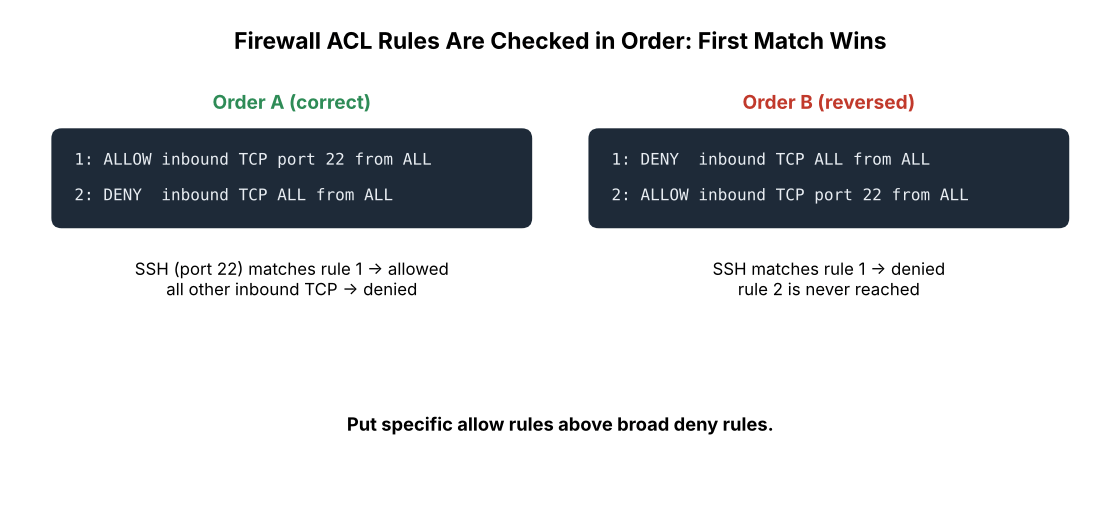
The critical rule: ACL rules are checked in order, and the first matching rule is applied. Changing the order can change what traffic gets through.
Two CED examples show the format:
Allow inbound TCP port 22 from ALL;permits all inbound TCP traffic to port 22, the port for SSH.Deny inbound TCP port 80 from 192.168.1.0/24;blocks inbound port 80 traffic from addresses 192.168.1.0 through 192.168.1.255.
Order Matters: A Side-by-Side
| Order A (correct) | Order B (reversed) |
|---|---|
| Rule 1: ALLOW inbound TCP port 22 from ALL; Rule 2: DENY inbound TCP ALL from ALL; |
Rule 1: DENY inbound TCP ALL from ALL; Rule 2: ALLOW inbound TCP port 22 from ALL; |
| SSH traffic matches Rule 1 and is allowed; all other inbound TCP is denied | All inbound TCP, including SSH, matches Rule 1 and is denied; Rule 2 is never reached |
General principle: put specific allow rules above broad deny rules.
Where Firewalls Belong
- Every network segment should have a firewall controlling data into and out of it.
- Segments can have different security levels, so each firewall is configured independently.
- Every point of ingress and egress between the internal network and the public internet needs a firewall.
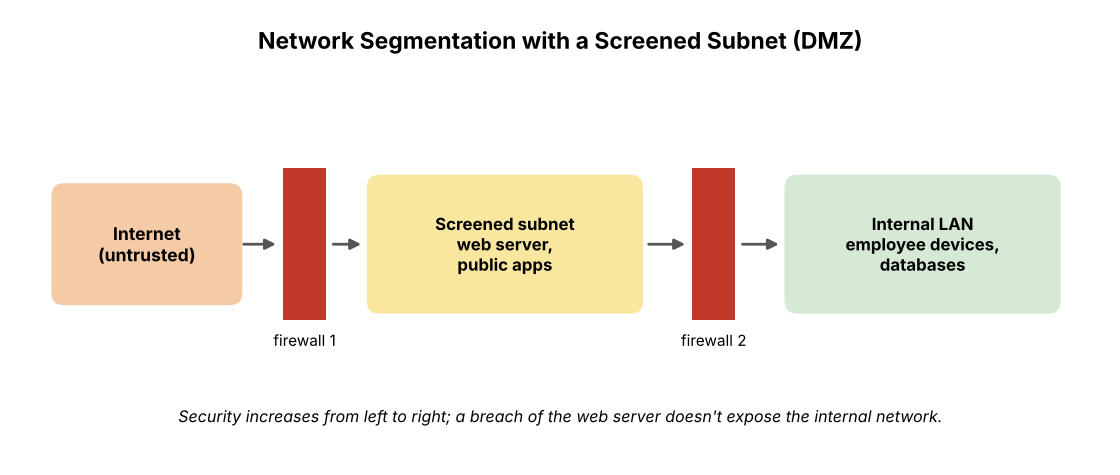
In the screened subnet design from Topic 3.3, that means one firewall between the internet and the DMZ, and a stricter one between the DMZ and the internal LAN.
Worked Example: Configuring a Web Server Firewall
Requirements: A public web server must accept HTTPS (TCP port 443) from anyone. Only the IT subnet 10.0.5.0/24 may connect by SSH (port 22). All other inbound TCP must be blocked.
ALLOW inbound TCP port 443 from ALL;ALLOW inbound TCP port 22 from 10.0.5.0/24;DENY inbound TCP ALL from ALL;
Check each case: A customer’s HTTPS request matches Rule 1, allowed. An IT admin’s SSH from 10.0.5.20 matches Rule 2, allowed. An SSH attempt from anywhere else skips Rules 1 and 2 and matches Rule 3, denied. If Rule 3 were moved to the top, the website would go dark for everyone.
Why does this matter? The Device Security Analysis free-response question may give you firewall configurations and ask how a change would affect traffic, devices, and users. Tracing packets through rules in order is the core skill.
Test-Taking Strategies
Mnemonic Devices and Memory Shortcuts
“First match wins.” For each rule, remember “Direction, Criterion, Action.” Firewall types: “Stateless sees headers, Stateful sees conversations, NGFW sees inside.”
Cross-Topic Connections
- Topic 3.3: Protecting Networks: Segmentation explains the zones firewalls separate.
- Topic 3.1: Network Vulnerabilities and Attacks shows what happens without a properly configured firewall.
- Topic 3.2: Protecting Networks: Managerial Controls and Wireless Security covers router policies that require firewalls.
- AP® Computer Science Principles Topic 3.6: Conditionals uses the same if-then logic as firewall rules.
Common Question Formats
- An ACL and a packet asking whether the packet is allowed.
- A requirement asking which rule set meets it.
- A network diagram asking where a firewall should be added.
Frequent Student Mistakes
- Reading every rule instead of stopping at the first match.
- Placing a broad deny rule above specific allow rules.
- Thinking a firewall must be a separate box. It is software that can run on a router.
Test-Day Shortcuts
Trace one test packet at a time from the top of the list. Write the rule number it matches next to it. This avoids order mistakes under time pressure.
Time Management Tips
The AP Cybersecurity Exam on May 5, 2027, is fully digital in Bluebook. The free-response section gives you 50 minutes for one Device Security Analysis question worth 30% of your score, so firewall tracing deserves real practice time.
Check for Understanding
Think you’ve got it? Complete the quiz below to make sure. Download your results at the end.