
Maximize your score with these resources:
Ships are built with watertight compartments so that one breach in the hull floods a single section instead of sinking the whole vessel. Networks can be built the same way. If every device sits on one big flat network, an adversary who compromises a single laptop can reach everything else. Divide the network into separate segments, and one compromised device stays contained. Topic 3.3 explains the techniques for segmenting a network and why segmentation makes networks safer.
This article covers Topic 3.3: Protecting Networks: Segmentation in Unit 3, Securing Networks. The topic asks you to identify techniques for segmenting a network and explain why segmentation increases network security.
By the end, you should be able to:
- Define network segmentation and subnets.
- Describe screened subnets (DMZs), subnetting, and VLANs.
- Explain three security benefits of segmentation.
- Explain how port security stops MAC flooding.
What Network Segmentation Means
Network segmentation divides a network into smaller, isolated segments called subnetworks, or subnets. Instead of one large network where every device can reach every other device, traffic is separated into zones with controlled connections between them.
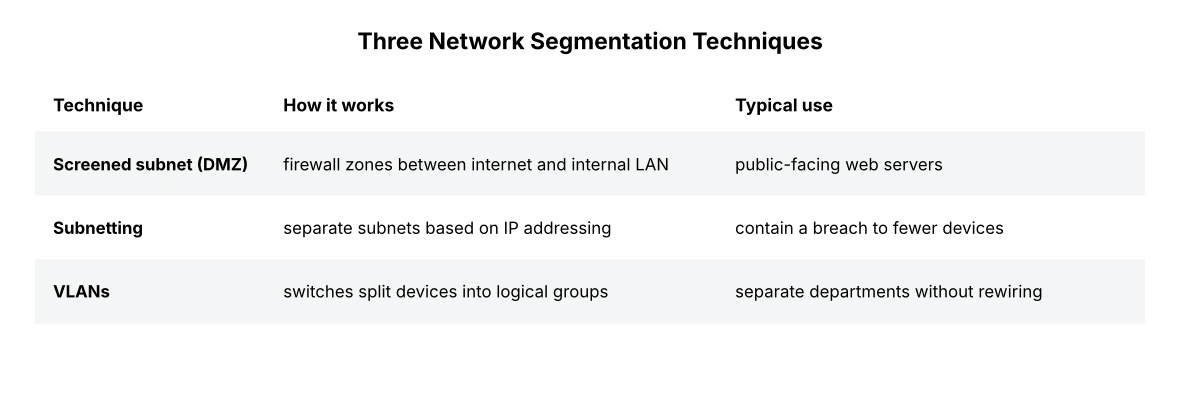
Three Segmentation Techniques
| Technique | How it works | Typical use |
|---|---|---|
| Screened subnet (also called a DMZ, demilitarized zone) | Firewall zones and rules create a segment between the public internet and the private internal network | Holds public-facing resources like web servers, separated from internal systems |
| Subnetting | Creates separate subnets based on IP addressing | Contains a breach on one subnet so fewer devices are exposed |
| VLANs (virtual LANs) | Switches logically separate devices that are physically connected to the same central switches | Separating departments or device types without new wiring |
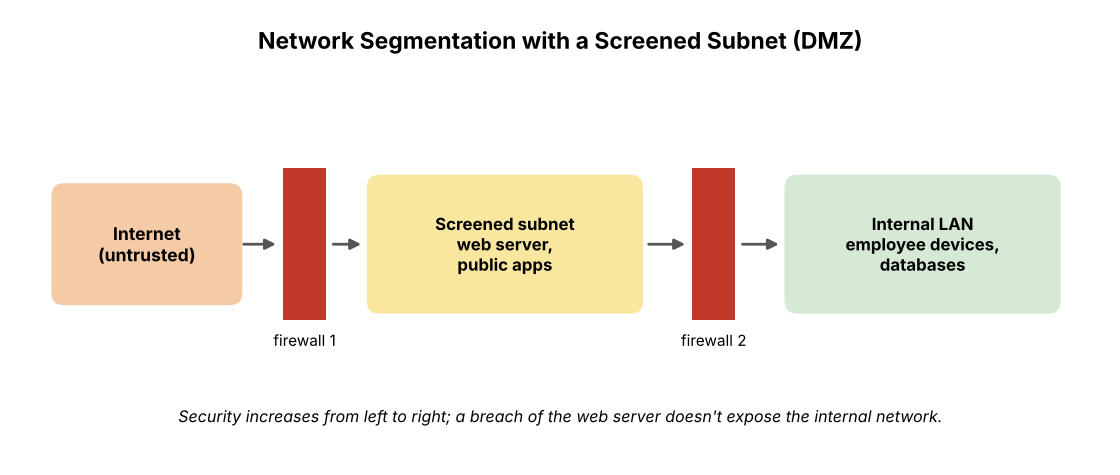
How a screened subnet is arranged:
Picture three zones in a row:
- The internet (untrusted).
- The screened subnet, behind a first firewall but still reachable from outside. It is a lower security zone than the internal network and often hosts websites or web applications.
- The internal LAN, behind a second firewall that restricts access much more strictly.
If an adversary compromises the public web server, they are still outside the internal network and must get past another firewall.
Why Segmentation Increases Security
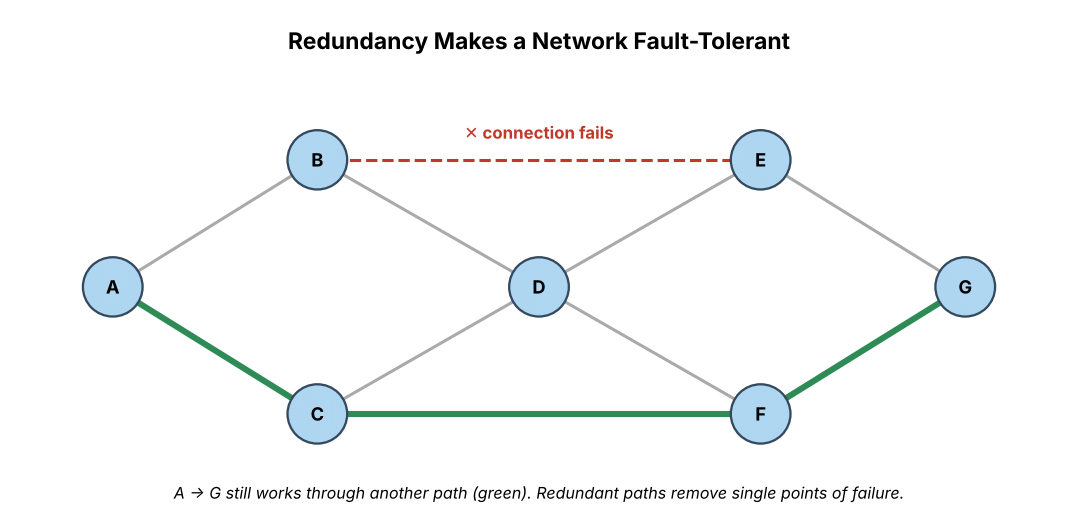
- It isolates traffic. An attack on one subnet is less likely to affect devices on other subnets. This limits lateral movement, the attack phase from Topic 2.1.
- It allows different rules for different zones. Each segment can have its own security policies and controls, creating higher security zones and lower security zones.
- It contains breaches. If a device is compromised, fewer other devices are exposed.
Port security adds a switch-level defense: by limiting the number of addresses assignable to a single switch port, it prevents the MAC flooding attack from Topic 3.1, which tries to overwhelm a switch with fake MAC addresses.
Worked Example: A Hospital Network
A hospital runs three kinds of systems on one flat network: a public website where patients book appointments and pay bills, an internal file server holding patient records, and guest Wi-Fi for visitors.
| System | Segment | Security level |
|---|---|---|
| Appointment and billing web servers | Screened subnet (DMZ) | Lower: must be reachable from the internet |
| Patient records file server | Internal LAN behind a second, stricter firewall | Highest |
| Guest Wi-Fi | Its own VLAN or subnet with internet access only | Isolated from internal systems |
- Before: A visitor’s infected phone on guest Wi-Fi could reach the records server directly.
- After: The guest segment cannot reach the internal LAN at all. A compromised web server in the DMZ still faces the second firewall.
- Bonus: Enabling port security on hallway data ports blocks MAC flooding from anyone who plugs in.
Why does this matter? Segmentation turns a single point of failure into a series of barriers. It is defense in depth applied to network design.
Test-Taking Strategies
Mnemonic Devices and Memory Shortcuts
Segmentation tools: “DMZ for the public, Subnets by address, VLANs by switch.” Benefits: “Isolate, Customize, Contain.”
Cross-Topic Connections
- Topic 3.1: Network Vulnerabilities and Attacks explains MAC flooding and why unsegmented networks are high risk.
- Topic 3.2: Protecting Networks: Managerial Controls and Wireless Security covers the switch policy requiring port security.
- Topic 2.1: Cyber Foundations defines lateral movement and defense in depth.
- AP® Computer Science Principles Topic 4.1: The Internet explains IP addressing that subnetting builds on.
Common Question Formats
- A network diagram asking where a public web server should be placed.
- A scenario asking how segmentation would limit an attack.
- A question asking which control prevents MAC flooding.
Frequent Student Mistakes
- Putting the public web server on the internal LAN.
- Thinking the DMZ is the most secure zone. It is a lower security zone than the internal network.
- Assuming VLANs require separate physical switches. They are logical separations.
Test-Day Shortcuts
Ask “Who needs to reach this?” If the public must reach it, it goes in the screened subnet. If only staff need it, it goes on the internal network behind the stricter firewall.
Time Management Tips
The AP Cybersecurity Exam on May 5, 2027, is fully digital in Bluebook. Network diagram questions reward a quick sketch: draw the internet, the DMZ, and the LAN in a line before you read the answer choices.
Check for Understanding
Think you’ve got it? Complete the quiz below to make sure. Download your results at the end.