
Maximize your score with these resources:
Every message you send across a network passes through equipment you never see: switches, routers, gateways, and name servers. Each one relies on rules that assume everyone is telling the truth. A device says “I am this address,” and the network believes it. Network attacks exploit that trust to listen in, redirect traffic to fake sites, or flood a network until it stops working. Topic 3.1 opens the networking unit by naming the most common network attacks, the weaknesses they exploit, and how to rate the risks.
This article covers Topic 3.1: Network Vulnerabilities and Attacks in Unit 3, Securing Networks. The topic asks you to identify common network attacks, explain how adversaries exploit network vulnerabilities, and assess and document network risks.
By the end, you should be able to:
- Identify ARP poisoning, MAC flooding, DNS poisoning, and smurf attacks.
- Connect each attack to its category: on-path, eavesdropping, credential harvesting, or denial of service.
- Explain how open ports, weak wireless security, and missing firewalls create openings.
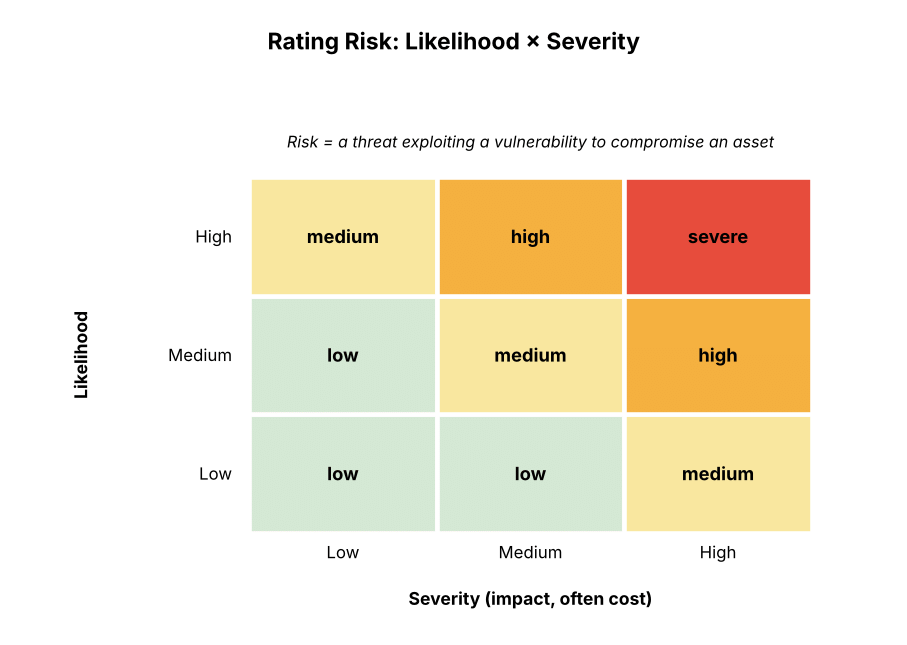
- Rate network risks as high, moderate, or low.
Four Common Network Attacks
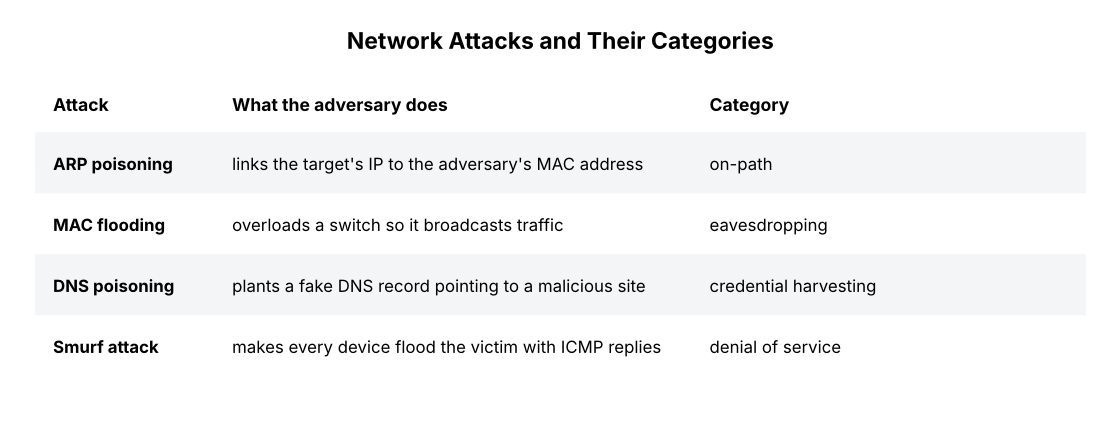
| Attack | What the adversary does | Attack category |
|---|---|---|
| ARP poisoning | Sends falsified ARP packets so the gateway’s table links the target’s IP address to the adversary’s MAC address (faking a MAC address is MAC spoofing) | On-path (man-in-the-middle) |
| MAC flooding | Sends a switch many Ethernet frames with different MAC addresses, which can force it into broadcast mode | Eavesdropping (sniffing) |
| DNS poisoning | Pretends to be an authoritative name server and plants a fake DNS record that redirects browsers to a malicious site | Credential harvesting |
| Smurf attack | Sends many ICMP requests carrying the victim’s address to the network’s broadcast address, so every device replies to the victim | Denial of service (DoS) |
Key background terms:
- ARP (address resolution protocol) lets a gateway build a table pairing IP addresses (network addresses) with MAC addresses (hardware addresses).
- DNS (domain name system) translates website names into IP addresses.
- ICMP (Internet Control Message Protocol) carries network status messages like ping requests.
The Attack Categories
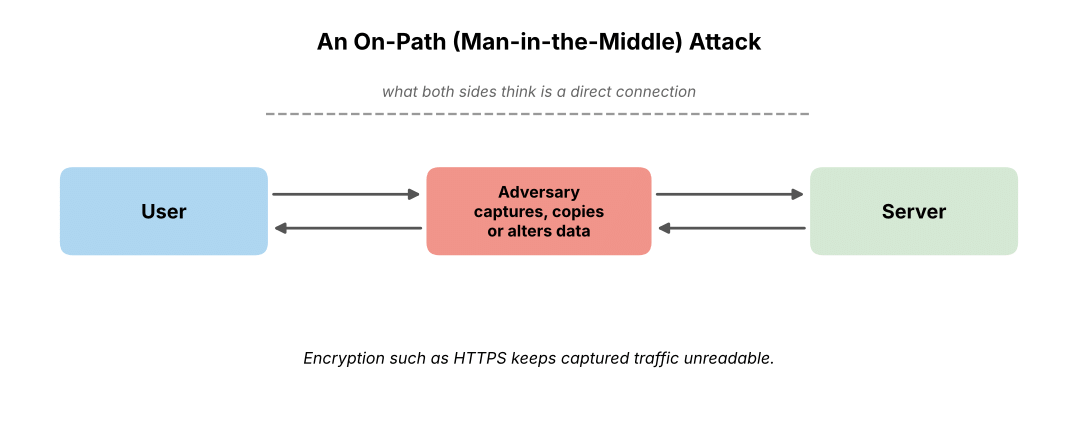
- On-path attack: the adversary secretly sits between two parties, captures their data, and copies or alters it before passing it on. Both parties think they are talking directly to each other.
- Eavesdropping (sniffing): capturing data in transit to record and copy it.
- Credential harvesting: a fake login site that looks real collects users’ real credentials.
- Denial of service: makes a system unavailable to authorized users. When many devices attack one target at once, it is a distributed denial of service (DDoS).
How Adversaries Get In
| Vulnerability | What it allows |
|---|---|
| No firewall, or a misconfigured one | Malicious traffic that floods the network, maps its structure, or spoofs legitimate devices |
| One compromised device | A springboard to attack other devices on the LAN |
| Data ports without port security | Plugging into the switch to launch DoS, MAC flooding, or MAC spoofing |
| Wireless signal leaking outside the building | Gathering network information and attempting eavesdropping or cryptographic attacks |
| No device or user authentication | Easily joining the network to attack from inside |
| Open network port | Plugging in a rogue access point for wireless access to the LAN, bypassing firewalls |
| Weak wireless encryption | Breaking it to intercept, steal, or compromise data |
Rating Network Risks
Network vulnerabilities threaten all three parts of the CIA triad: confidentiality (intercepted data), integrity (altered data), and availability (DoS). Automated vulnerability scanners check networks, devices, and applications for known vulnerabilities and report their severity and recommended fixes. Because many exploits require advanced skill, difficulty affects likelihood.
| Rating | Description | CED example |
|---|---|---|
| High | An adversary could easily capture traffic, spoof a device, or launch DoS with significant impact | An unsegmented internal network, reachable by weakly encrypted Wi-Fi, hosting a proprietary web application server |
| Moderate | Could reveal information about systems or devices | An external firewall that does not block outside ICMP traffic |
| Low | Hard to exploit with minimal impact | Access points broadcasting a beacon frame with the SSID and encryption protocol |
Why does this matter? Recognizing the category behind an attack tells you which principle is at risk. That points straight to the right defenses in Topics 3.2 through 3.5.
Test-Taking Strategies
Mnemonic Devices and Memory Shortcuts
Match attack to effect: “ARP = in the middle, MAC flood = listen, DNS = fake site, Smurf = swamp.”
Cross-Topic Connections
- Topic 1.3: Best Practices for Public Networks introduces evil twins, jamming, and denial of service.
- Topic 2.1: Cyber Foundations explains the CIA triad and lateral movement.
- Topic 2.2: Physical Vulnerabilities and Attacks shows how physical access leads to network access.
- AP® Computer Science Principles Topic 4.1: The Internet covers IP addresses, DNS, and routing.
Common Question Formats
- An attack description asking which attack or category it is.
- A network setup asking which vulnerability is most serious.
- A vulnerability asking whether it is high, moderate, or low risk.
Frequent Student Mistakes
- Confusing IP addresses (network) with MAC addresses (hardware).
- Calling DNS poisoning a DoS attack. It redirects users to steal credentials.
- Treating DoS and DDoS as the same. DDoS uses many attacking devices.
Test-Day Shortcuts
Ask what the attacker wants. To read data: eavesdropping or on-path. To steal logins: credential harvesting. To knock services offline: DoS.
Time Management Tips
The AP Cybersecurity Exam on May 5, 2027, is fully digital in Bluebook, with 60 multiple-choice questions in 80 minutes. Network questions often include acronyms, so write each acronym’s meaning in your scratch notes the first time you see it.
Check for Understanding
Think you’ve got it? Complete the quiz below to make sure. Download your results at the end.