
Maximize your score with these resources:
A mid-sized company’s network might log millions of events a day: logins, file downloads, website visits, emails, and connections between devices. Somewhere in that flood, a handful of events could be an adversary quietly testing passwords or copying files. No team of humans could read every line. This is where AI earns its place on the defensive side. The same technology adversaries use to sharpen attacks can help defenders spot and stop them faster. Topic 1.5 explains how, and why human experts still need to stay in the loop.
This article covers Topic 1.5: Leveraging AI in Cyber Defense in Unit 1, Introduction to Security. The topic asks you to explain how defenders can use AI-powered tools to protect networks, applications, and data, and how AI enables faster and more accurate threat detection and response.
By the end, you should be able to:
- Describe three ways AI tools help strengthen defenses before an attack.
- Explain why every AI recommendation must be reviewed by a knowledgeable human.
- Explain how AI sorts huge volumes of events to find likely malicious activity.
- Describe how AI tools alert defenders or take corrective action automatically.
AI for Prevention: Hardening Systems
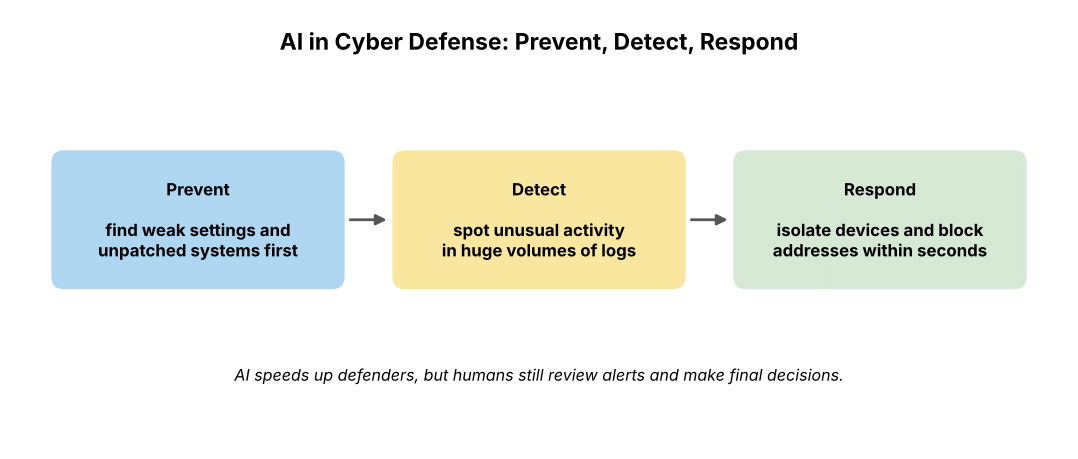
| AI task | What it does | Who must review it |
|---|---|---|
| Reviewing security configurations | Checks settings like firewall rules and access controls and recommends more secure options | A knowledgeable security technician |
| Analyzing application code | Finds vulnerabilities and recommends mitigations | A knowledgeable programmer |
| Suggesting detection rules | Proposes rules for automated detection systems | A knowledgeable detection engineer |
The CED repeats one rule in every case: a qualified human must review AI recommendations before they are put into use. AI tools can be wrong, can miss context, and, as Topic 1.4 showed, can be trained on poisoned data. A bad firewall rule applied automatically could block legitimate users or leave a gap open. Human review catches those errors.
AI for Detection: Finding the Needle
The detection problem is about scale:
- Networks generate millions of digital events every day.
- Some of those events likely represent an adversary’s malicious activity.
- Humans cannot carefully examine them all.
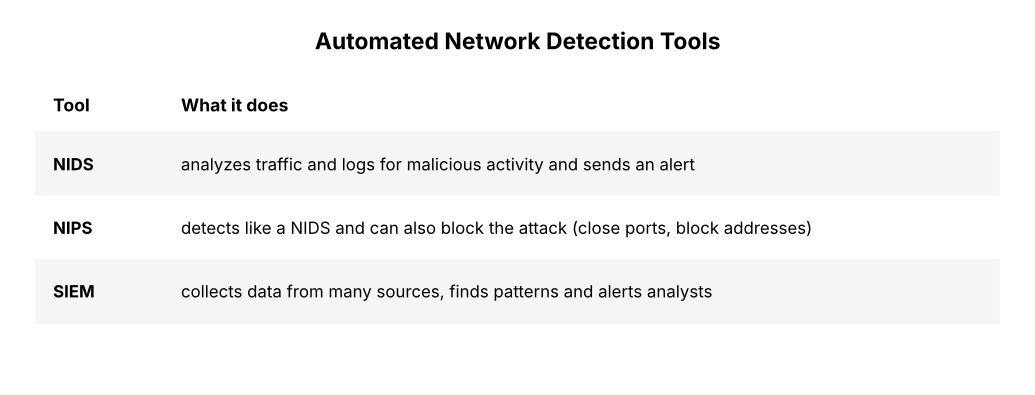
AI-powered tools can be trained to quickly analyze events and sort the likely malicious ones from the harmless ones. That turns millions of events into a short list worth a human’s attention.
AI for Response: Acting Fast
Once likely malicious activity is found, AI tools can be programmed to do one of two things:
- Alert human cybersecurity personnel so they can investigate.
- Take specific corrective actions based on the type of activity, such as locking an account under attack.
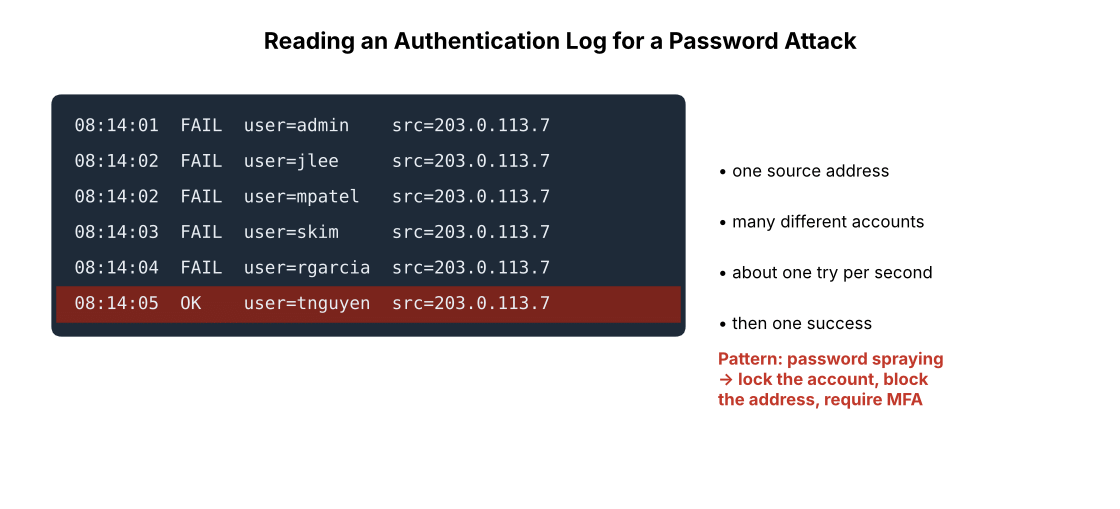
Why does this matter? Speed limits damage. The CED notes that AI-powered tools let threat-detection and response teams catch malicious activity and intervene quickly to prevent loss, harm, damage, and destruction to digital infrastructure and data. An attack stopped in minutes does far less harm than one discovered weeks later.
Worked Example: A School District’s Security Team
A school district’s network logs about 4 million events per day. Its two-person security team uses an AI tool.
- Sorting: The AI flags 35 events as likely malicious, including 200 failed logins to a teacher’s account from an unknown device at 2 a.m., the pattern from Topic 1.2.
- Automatic response: Following a rule the team approved, the tool temporarily locks the teacher’s account and sends an alert.
- Human review: An analyst confirms the attack, contacts the teacher, resets the password, and enables MFA.
- Prevention: The AI also suggests a new detection rule for similar login bursts. A detection engineer reviews and adjusts it before adding it to the system.
Without the AI, two people could not have found 35 suspicious events among 4 million in time. Without the humans, an unreviewed rule might have locked out hundreds of legitimate users.
Test-Taking Strategies
Mnemonic Devices and Memory Shortcuts
AI in defense does three jobs: “Harden, Hunt, Help”, meaning harden configurations and code, hunt for malicious events, and help responders act. And always: “AI suggests, humans decide.”
Cross-Topic Connections
- Topic 1.4: AI-Based Cybersecurity Attacks covers the offensive side of AI.
- Topic 1.2: Suspicious Website Logins describes login patterns that detection tools flag.
- Topic 1.3: Best Practices for Public Networks introduces denial of service and other attacks detection must catch.
- AP® Computer Science Principles Topic 2.3: Extracting Information from Data explains how large data sets reveal patterns.
Common Question Formats
- A scenario asking how an AI tool could help a defender.
- A question asking who should review a specific AI recommendation.
- A question asking why AI is needed to analyze network events.
Frequent Student Mistakes
- Saying AI recommendations can be applied directly without review.
- Assuming AI replaces security teams. It helps them focus.
- Forgetting that AI can both alert humans and take automatic action.
Test-Day Shortcuts
If an answer choice lets AI change a system with no human review, it is almost always wrong. Look for the choice that keeps a qualified person in the loop.
Time Management Tips
The AP Cybersecurity Exam on May 5, 2027, is fully digital in Bluebook. Section II’s Device Security Analysis question gives you 50 minutes and is worth 30% of your score. Questions about automated systems and how they affect device behavior can appear there.
Check for Understanding
Think you’ve got it? Complete the quiz below to make sure. Download your results at the end.