
Maximize your score with these resources:
The simplest security advice is also some of the most ignored: install the update, run the antivirus, and do not download random software. Organizations cannot count on every employee to remember that on their own, so they turn the advice into written policies and back it up with software that enforces it. Topic 4.3 covers the managerial controls that govern how devices are used and the three technical defenses every device should have: anti-malware, updates, and a host-based firewall.
This article covers Topic 4.3: Protecting Devices in Unit 4, Securing Devices. The topic asks you to identify managerial controls for device security, explain how anti-malware software and updates make devices more secure, and configure a host-based firewall.
By the end, you should be able to:
- Describe what acceptable use, password, and software installation policies typically include.
- Explain how anti-malware software uses signatures to find and remove malware.
- Explain why patches and updates close known vulnerabilities.
- Configure a host-based firewall, including outbound rules.
Three Device Policies
| Policy | Typical contents |
|---|---|
| Acceptable use policy | What users may, may not, or must do on organization devices: block certain websites (such as social media or gaming), require software updates, allow peripheral devices, prohibit external drives or media |
| Password policy | Minimum or maximum length; how long a password may be kept; no reuse; construction rules such as no dictionary words and required character sets; use password managers instead of writing passwords down |
| Software installation policy | Whether users may install software, a list of approved software, and a process to request new software needed for a role |
These are managerial controls. They reduce risk by setting expectations, and each one connects to a vulnerability from Topic 4.1. Banning external drives counters autorun malware, update rules counter unpatched software, and installation limits counter trojans hidden in “free” programs.
Anti-Malware Software
Anti-malware software, sometimes called antivirus software, finds, quarantines, and removes malware that can corrupt, spy on, or destroy a system.
- Malware contains detectable indicators called signatures.
- The software keeps a database of known malware signatures.
- It periodically scans files and compares them to the database.
- If a file matches, the software quarantines and removes it.
This is signature-based detection, the same idea as in Topic 3.5. It is fast and accurate for known malware, which is why the signature database must stay updated.
Updates and Patches
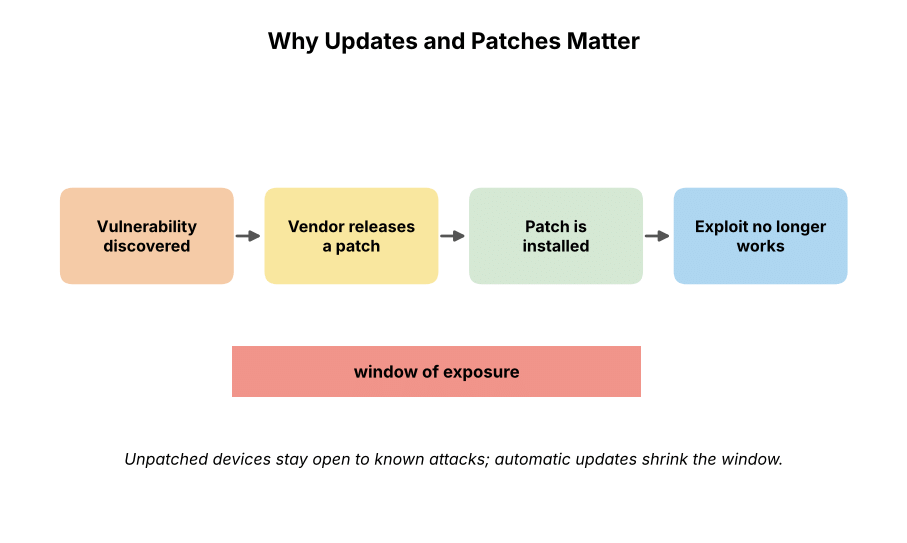
When a vulnerability is discovered in an operating system or application, the vendor fixes it and releases an update. A small update is called a patch. Keeping software updated to the latest version prevents adversaries from exploiting known vulnerabilities. Unpatched devices remain open to attacks that already have a fix, which is why a missing critical patch on an email server is rated high risk in Topic 4.1.
Host-Based Firewalls
A host-based firewall is software running on a single device that allows or denies traffic into or out of that device. It adds a layer of protection if the device ends up on a compromised network.
- It follows an ACL, just like a network firewall: rules run in order, and the first match wins.
- Rules can filter by source or destination port or IP address, service, protocol, or application.
- It can block outbound traffic as well as inbound.
- It should block every port or service the device does not need.
Why outbound rules matter: The CED’s example blocks outbound FTP. If an adversary gains remote access, they cannot use FTP to exfiltrate, or send out, files to their own server.
Worked Example: Hardening a Front Desk Laptop
A medical office’s front desk laptop only needs web browsing (HTTPS, port 443) and access to the scheduling server at 10.0.2.15 on port 8443.
ALLOW outbound TCP port 443 to ALL;ALLOW outbound TCP port 8443 to 10.0.2.15;DENY outbound TCP ALL to ALL;DENY inbound TCP ALL from ALL;
Then add the managerial and technical layers: apply the acceptable use policy (no external drives), turn on automatic updates, and run anti-malware with an up-to-date signature database. If malware slips in anyway, Rule 3 blocks it from sending data out over other ports.
Why does this matter? Each control covers a different gap: policies shape behavior, anti-malware catches known threats, updates close known flaws, and the firewall limits what any intruder can do.
Test-Taking Strategies
Mnemonic Devices and Memory Shortcuts
Device defense in three words: “Scan, Patch, Block.” Policies: “Use, Password, Install.”
Cross-Topic Connections
- Topic 4.1: Device Vulnerabilities and Attacks lists the vulnerabilities these controls close.
- Topic 3.4: Protecting Networks: Firewalls explains ACL rule order in network firewalls.
- Topic 3.5: Detecting Network Attacks compares signature-based and anomaly-based detection.
- Topic 4.2: Authentication covers the login settings a password policy requires.
Common Question Formats
- A policy rule asking which type of policy it belongs to.
- A firewall rule set asking whether specific traffic is allowed.
- A question asking why an update protects against a specific exploit.
Frequent Student Mistakes
- Forgetting that host-based firewalls can block outbound traffic.
- Assuming anti-malware catches brand-new malware. Signature databases only know known threats.
- Treating a patch as optional when it fixes a known vulnerability.
Test-Day Shortcuts
If a question asks how to stop data from leaving a compromised device, look for an outbound firewall rule. If it asks how to stop a known exploit, look for a patch.
Time Management Tips
The AP Cybersecurity Exam on May 5, 2027, is fully digital in Bluebook. The Device Security Analysis question asks how configuration changes affect a device and its users. Trace each firewall rule against each service the user needs before you answer.
Check for Understanding
Think you’ve got it? Complete the quiz below to make sure. Download your results at the end.