
Maximize your score with these resources:
Imagine you want to send a secret message to someone you have never met. With symmetric encryption, you would both need the same key, but how do you share that key without an eavesdropper catching it? Asymmetric encryption solves this puzzle with a clever idea: a mailbox with a slot. Anyone can drop a letter in through the slot, but only the owner holds the key that opens the box. Topic 5.4 explains public and private keys, why key length matters, and how to use asymmetric encryption.
This article covers Topic 5.4: Asymmetric Cryptography in Unit 5, Securing Applications and Data. The topic asks you to determine which asymmetric key to use when sending or receiving data, explain why key length affects security, and apply asymmetric algorithms to encrypt and decrypt data.
By the end, you should be able to:
- Explain how a public and private key pair works.
- Choose the correct key to encrypt a message to someone.
- Calculate keyspace and average guesses for an n-bit key.
- Read OpenSSL commands that generate RSA keys and encrypt and decrypt a file.
Key Pairs
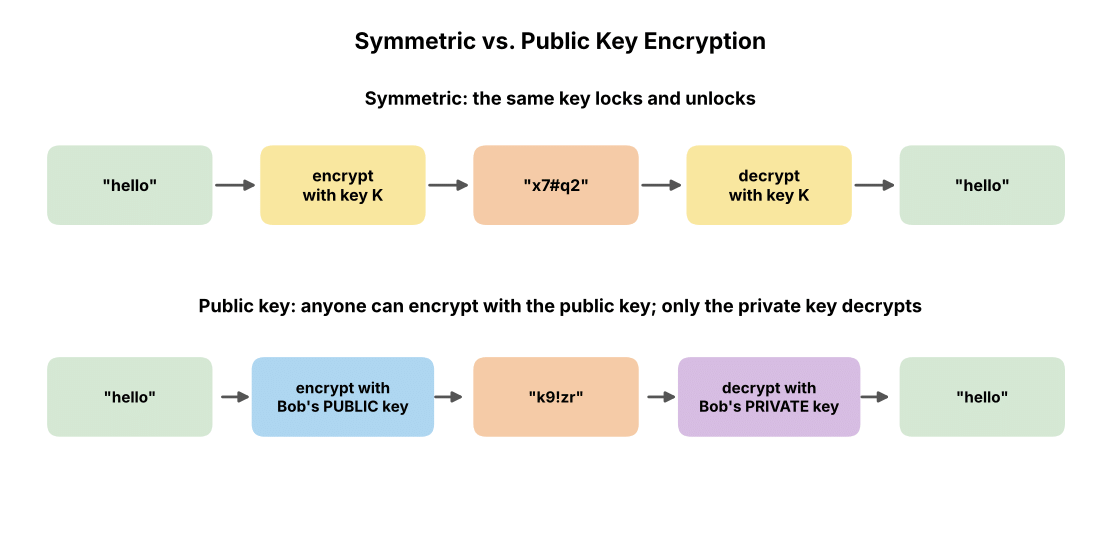
Asymmetric encryption lets people communicate securely without arranging a shared secret key first.
- Each person who will receive data generates a key pair: two binary strings of equal length, created together by a mathematical process.
- One is the public key, published for anyone to see and use. The other is the private key, stored securely.
- The keys are mathematical inverses: whatever one key encrypts, only the other can decrypt.
- If the private key is exposed, shared, stolen, corrupted, or compromised, the pair must be deleted and replaced, because all of the security rests on the private key.
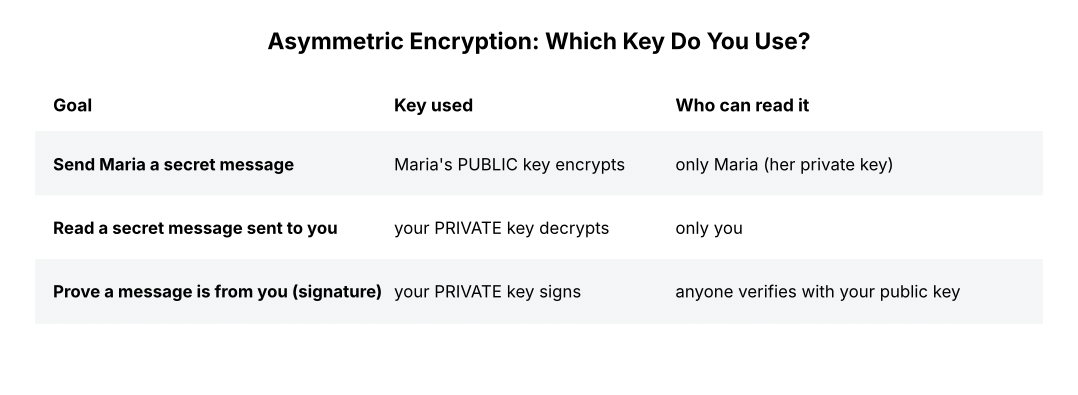
Which Key Do You Use?
| Goal | Key used | Who can decrypt |
|---|---|---|
| Send a secret message to Maria | Maria’s public key to encrypt | Only Maria, with her private key |
| Read a secret message sent to you | Your private key to decrypt | Only you |
The rule to remember: encrypt with the receiver’s public key; the receiver decrypts with their own private key. Never use your own keys to send a confidential message to someone else.
Why Key Length Matters
An n-bit key has a keyspace of \(2^{n}\) possible keys. An adversary guessing randomly will, on average, find the key after searching half the keyspace:
\(\dfrac{2^{n}}{2}=2^{n-1}\) guesses on average
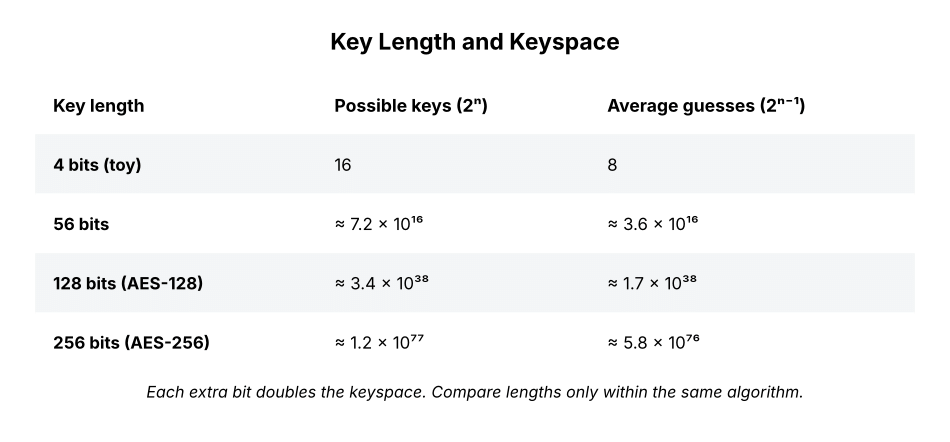
Example: A toy 4-bit key has \(2^{4}=16\) possible keys, so an adversary needs about \(2^{3}=8\) guesses on average. Real keys are far longer in bits, making guessing hopeless with today’s computers.
- Longer keys are more secure but slower to encrypt and decrypt.
- Computers keep getting faster, so recommended key lengths are raised periodically.
- Compare key lengths only within the same algorithm. AES 256-bit beats AES 128-bit, and RSA 4096-bit beats RSA 2048-bit, but an RSA key length cannot be compared directly to an AES key length.
Using Asymmetric Encryption
Common asymmetric algorithms are RSA and elliptic curve cryptography (ECC). They power digital signatures and digital certificates. As with AES, you can use the command line, specialized software such as the open-source RSA Encryption Tool, or web-based tools. The CED’s OpenSSL workflow:
| Step | Command |
|---|---|
1. Generate a 2048-bit RSA key pair into rsa.pem |
openssl genrsa -out rsa.pem |
2. Extract the public key into public.pem |
openssl rsa -pubout -in rsa.pem -outform PEM -out public.pem |
3. Encrypt test with the public key |
openssl pkeyutl -encrypt -pubin -inkey public.pem -in test -out test.enc |
| 4. Decrypt with the private key file | openssl pkeyutl -decrypt -inkey rsa.pem -in test.enc -out test |
Notice which file appears in each step: public.pem for encrypting (step 3), rsa.pem, which holds the private key, for decrypting (step 4).
Worked Example: Two Engineers Across the Country
Jordan, in California, needs to send a confidential plant schematic to Priya, in Maine. They have never exchanged a secret.
- Priya generates a key pair and keeps the private key on her own secured computer.
- Priya publishes her public key, even by plain email. It is fine if others see it.
- Jordan encrypts the file with Priya’s public key and sends the ciphertext.
- Priya decrypts with her private key. An eavesdropper who captured both the ciphertext and the public key still cannot read the file.
- To reply securely, Priya uses Jordan’s public key, so Jordan needs his own key pair too.
Why does this matter? Asymmetric encryption makes secure contact possible between strangers, which is why it underlies secure websites, certificates, and signed software.
Test-Taking Strategies
Mnemonic Devices and Memory Shortcuts
“Lock with theirs, unlock with mine.” Encrypt with the receiver’s public key; decrypt with your own private key. Average guesses: “half the keyspace, 2 to the n minus 1.”
Cross-Topic Connections
- Topic 5.3: Protecting Stored Data with Cryptography covers symmetric encryption and keyspace.
- Topic 5.2: Protecting Applications and Data describes cryptography policies on key length and storage.
- Topic 3.2: Protecting Networks mentions public/private key authentication in VPN policies.
- AP® Computer Science Principles Topic 5.6: Safe Computing introduces public key encryption and certificates.
Common Question Formats
- A scenario asking which key the sender should use.
- A key length asking for the keyspace or average number of guesses.
- A response to a stolen private key asking what must happen next.
Frequent Student Mistakes
- Encrypting with your own public key when sending to someone else.
- Comparing RSA and AES key lengths directly.
- Thinking a compromised key pair can keep being used.
Test-Day Shortcuts
Find the receiver in the question first. Whatever is being sent to them is encrypted with their public key, and only their private key decrypts it.
Time Management Tips
The AP Cybersecurity Exam on May 5, 2027, is fully digital in Bluebook. Key-selection questions are quick if you name the receiver before reading the choices, which saves time for longer log-analysis items.
Check for Understanding
Think you’ve got it? Complete the quiz below to make sure. Download your results at the end.